
An immediate-mode GUI library for Rust — WPF-style two-pass layout, wgpu renderer.


I wanted a cross-platform GUI library — simple yet powerful, WPF-style layout declaration, good-looking and fast. I made it.
Beta. Feature-rich and usable, but pre-1.0: the public API can still change between releases.
- Immediate-mode authoring — builder-style widgets that read like prose.
recorddescribes the whole UI every frame; there is no retained widget tree to keep in sync. - WPF-contract two-pass layout — measure, then arrange: Hug items shrink between their min- and max-content widths as auto table columns do, Fill items share the rest as WPF star tracks do, and nothing shrinks below its min-content floor.
- Fast — a full 2560×1440 app screen costs 20–85 µs of CPU per frame when nothing changed and 50–212 µs while the window resizes, and a steady-state frame allocates nothing. See Performance.
- Widgets included — buttons, text and text editing, sliders, checkboxes,
combo boxes, scroll and pan-zoom views, grids, tabs, a dock, popups, modals,
tooltips, context menus and a menu bar, all styled from one serializable
Theme. - SVG artwork — icons rasterize at their exact physical size into the icon atlas, so they stay crisp at any scale factor and cost nothing until first drawn. Gradients and filters included.
- Materials — blur, frosted glass and refracting glass on any rect or widget chrome, with a luminance ceiling that keeps text on it legible.
- Your own shaders — a WGSL effect paints any rect, circle or triangle, over what is beneath it or as a glow around it, with your parameters, images and a clock, and palantir clips and antialiases its edge.
- Shapes — rounded rects, circles, arcs, triangles, lines, curves and polylines, with gradients, images, drop and inset shadows, and rounded clips that cut anything inside them.
- Keyboard all the way —
Tabreaches every widget, dialogs and menus trap focus, and widgets take the keys WAI-ARIA gives their role. - IME text — an input method composes inline in a
TextEdit, underlined at the caret, and its candidate list follows the caret. - Raw
wgpuinside a widget — implementGpuPaintand aGpuViewruns your renderer into a widget-sized target, then composites it like any image: it clips, rounds and z-orders with everything else. - Embeddable — the winit host owns the window by default;
OffscreenHostrenders into awgpu::Textureyou supply, inside an event loop you own. - Headless UI tests —
Harnessruns the real UI with no window, and a GPU only when a test wants pixels. See Testing.


A short screen recording of the showcase, a tour of every widget:
2026-11-03.23-19-55.github.mp4
Built with Palantir: Darkroom, a node-graph editor for image and data pipelines.

cargo add palantirThe default features carry the winit host and the OS clipboard. With
default-features = false the only host left is OffscreenHost, the build
for an app that already owns its window and event loop.
use palantir::{
    App, Button, Configure, Panel, Sizing, Text, Ui, WindowToken, WinitHost, WinitHostError, fmt,
};

struct Counter { clicks: u32 }

impl App for Counter {
    // `win` names which window is being drawn; switch on it for multi-window
    // apps. This one has a single window, so it's ignored.
    fn record(&mut self, _win: WindowToken, ui: &mut Ui) {
        Panel::vstack()
            .gap(8.0)
            .size((Sizing::HUG, Sizing::HUG))
            .show(ui, |ui| {
                // `fmt!` formats into the frame's text arena — no `String`.
                Text::new(fmt!(ui, "clicks: {}", self.clicks)).show(ui);
                if Button::new().label("click me").show(ui).clicked() {
                    self.clicks += 1;
                }
            });
    }
}

fn main() -> Result<(), WinitHostError> {
    WinitHost::builder(WindowToken(0))
        .title("counter")
        .build(|_ui, _host| Counter { clicks: 0 })?
        .run()
}
For a tour of every widget, run the bundled showcase:
cargo run --profile release-dev -p palantir-showcaseYour own widgets. The crate root is what an application types;
palantir::widget is what a widget is built from. The showcase's
custom widget page,
palantir-showcase/src/pages/custom_widget.rs,
builds a Stepper entirely against the published API.
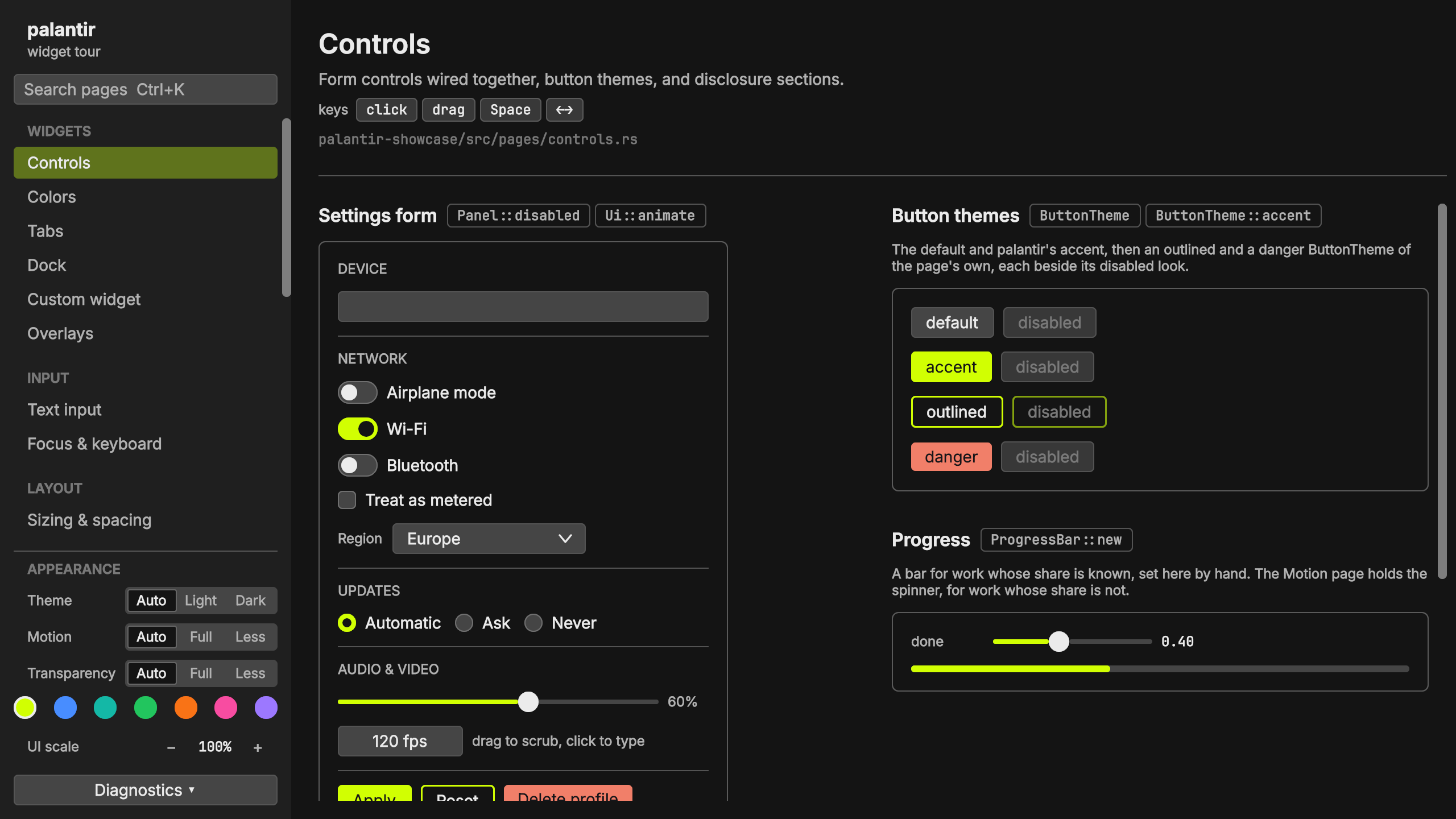
The frame bench drives the showcase's first page on a 2560×1440 surface at
2× scale. Each scenario runs two ways: the deviceless CPU pipeline (record →
measure → arrange → cascade → damage → encode + compose), and the full
public path through OffscreenHost, the CPU + GPU frame, with the GPU
drained before the next iteration.
| Apple M5 Metal |
Raspberry Pi 5 V3D, Vulkan |
Steam Deck RADV, Vulkan |
Intel i9-13980HX RTX 4090 Laptop, Vulkan |
|
|---|---|---|---|---|
| CPU pipeline | ||||
cached |
20.0 µs | 85.0 µs | 51.7 µs | 22.5 µs |
hovering |
23.3 µs | 106 µs | 64.8 µs | 27.1 µs |
partial |
30.5 µs | 142 µs | 87.4 µs | 34.0 µs |
alternating |
35.6 µs | 160 µs | 138 µs | 38.7 µs |
scrolling |
40.2 µs | 170 µs | 99.0 µs | 42.6 µs |
resizing |
49.7 µs | 212 µs | 127 µs | 52.5 µs |
typing |
57.6 µs | 251 µs | 154 µs | 63.8 µs |
theming |
75.8 µs | 362 µs | 224 µs | 99.2 µs |
| CPU + GPU frame | ||||
cached |
20.0 µs | 86.9 µs | 66.9 µs | 22.7 µs |
hovering |
269 µs | 2.42 ms | 661 µs | 140 µs |
partial |
278 µs | 2.70 ms | 753 µs | 152 µs |
alternating |
331 µs | 5.41 ms | 1.04 ms | 156 µs |
scrolling |
296 µs | 4.20 ms | 797 µs | 171 µs |
resizing |
307 µs | 4.29 ms | 930 µs | 185 µs |
typing |
296 µs | 2.60 ms | 894 µs | 197 µs |
theming |
400 µs | 5.13 ms | 1.57 ms | 373 µs |
- Scenarios.
cachedchanges nothing, so layout hits its cache and damage skips the paint.hoveringmoves the pointer between two widgets, one move a frame.partialchanges one counter, a small damage rect.alternatingtakes a scroll step, then a counter tick.scrollingmoves a transform.resizingchanges the surface size every frame, so every measure runs again.typingtypes a character into a focused field, then deletes it.themingblends two themes at a new phase every frame, so text reshapes and rasterizes anew. - Run. Each number is the median of one full run; the Apple M5 runs unpinned, the better of two runs, and every other machine pinned to one core. The Apple M5 and Raspberry Pi 5 columns were measured on 2026-11-11; the Steam Deck and Intel columns earlier, on an older build.
- Build. The x86 build sets
-C target-cpu=x86-64-v3(see Recommended build flag); an aarch64 build sets no flag.
The bench screen, the showcase's first page:
A steady-state frame allocates nothing after warmup. Per-frame data lives on
retained scratch that keeps its capacity across frames, and the alloc
test suite fails on any new per-frame allocation.
Color, corner radii, spacing and shadow geometry are stored as f16. Without
F16C in the target features, each conversion takes a runtime feature check
into a #[target_feature] fn that can't inline into its caller — a spill and
a call every time. x86-64-v3 carries F16C, plus AVX2 and FMA:
# .cargo/config.toml
[target.'cfg(target_arch = "x86_64")']
rustflags = ["-C", "target-cpu=x86-64-v3"]
F16C alone is worth 5–8% on the frame bench. The flag moves the CPU
floor to Haswell (2013), so it's the application's call — palantir keeps the
runtime fallback either way. An application that must run on older CPUs can
set -C target-feature=+f16c instead, for an Ivy Bridge (2012) floor.
Harness drives your interface with no window, no GPU and no event loop. It
records frames, feeds synthetic input, and reads the result back. A whole
interaction test costs microseconds, so UI behavior stays a plain cargo test.
- Act like a user —
click("Save")by text,click(id)by id orclick(point),right_click,drag_to,scroll_lines,pinch,type_text("hi"),key("ctrl+z".parse()?),hold_modifiers. - Ask what happened — a widget's arranged rect and response, the widget at a point, the visible widgets and their text, and the clipboard.
- Own the clock — step animations frame by frame, or move past the double-click interval. Every run is deterministic.
- Pick the surface — size, DPI scale, user scale, pixel snap, refresh rate. Test a 4K HiDPI layout on any machine.
- Play it as a person —
playruns a list ofActions, settling after each, and with a GPU (Harness::builder(size).depth(HarnessDepth::gpu(gpu)))shotreturns the window's pixels.
use palantir::glam::UVec2;
use palantir::{Button, Configure, Harness, Ui, WidgetId};

let inc = WidgetId::from_hash("inc");
let mut clicks = 0_u32;
let mut screen = |ui: &mut Ui| {
    if Button::new().id(inc).label("click me").show(ui).clicked() {
        clicks += 1;
    }
};

let mut h = Harness::new(UVec2::new(400, 200));
h.prime(2, &mut screen);
h.click("click me");
h.frame(&mut screen);

assert_eq!(clicks, 1);For pixels as well as behavior, the golden feature adds golden-image
regression tests. OffscreenHost renders a frame into a wgpu::Texture,
and the comparison reports exactly which pixels moved.
Known gaps, not design rejections:
- Rich text — one family / size / color per
Text; no inline spans. - Visual caret motion in bidirectional text —
TextEdit's arrow keys step graphemes in logical order, so inside a right-to-left run←moves the caret visually rightward.
Licensed under either of
at your option.
The bundled Inter and JetBrains Mono faces under assets/fonts are licensed
separately under the SIL Open Font License 1.1; their *-OFL.txt sit beside
them.