A docker-compose setup of common services with Traefik using Cloudflare dns-01 for letsencrypt certificates
Here is a complete list of available services and available games
Each of the 287+ services has comprehensive documentation including configuration details, environment variables, and available overrides:
- Service Documentation Index - Browse all service docs
- SERVICES.md - Quick service list with links to detailed docs
Example service docs: Plex • Jellyfin • Immich • Nextcloud
- Dashboard Guide - Web UI for managing your homelab
- Scaffolding Guide - Convention-based service configuration
- Migration Guide - Switching from master to main
- Database Architecture - Dedicated vs shared databases
- Network Architecture - Traefik and network patterns
- Backup Strategy - Backup and restore procedures
- Health Check Patterns - Standard health checks
- Agent Guide - Comprehensive guide for AI assistants working on OnRamp
Onramp uses Docker and it installs docker if you don't already have it installed (a check is run as part of the 'make install' command below).
This repo assumes that you are running a debian linux disto like Ubuntu!
A podman version is available as a branch here: https://github.com/traefikturkey/onramp/tree/podman This branch is in testing and may have bugs/issues that are not present in main branch Testing and PR's are welcome and encouraged!
You'll need a personal domain that's setup with Cloudflare and an scoped API token created like shown below, https://dash.cloudflare.com/profile/api-tokens
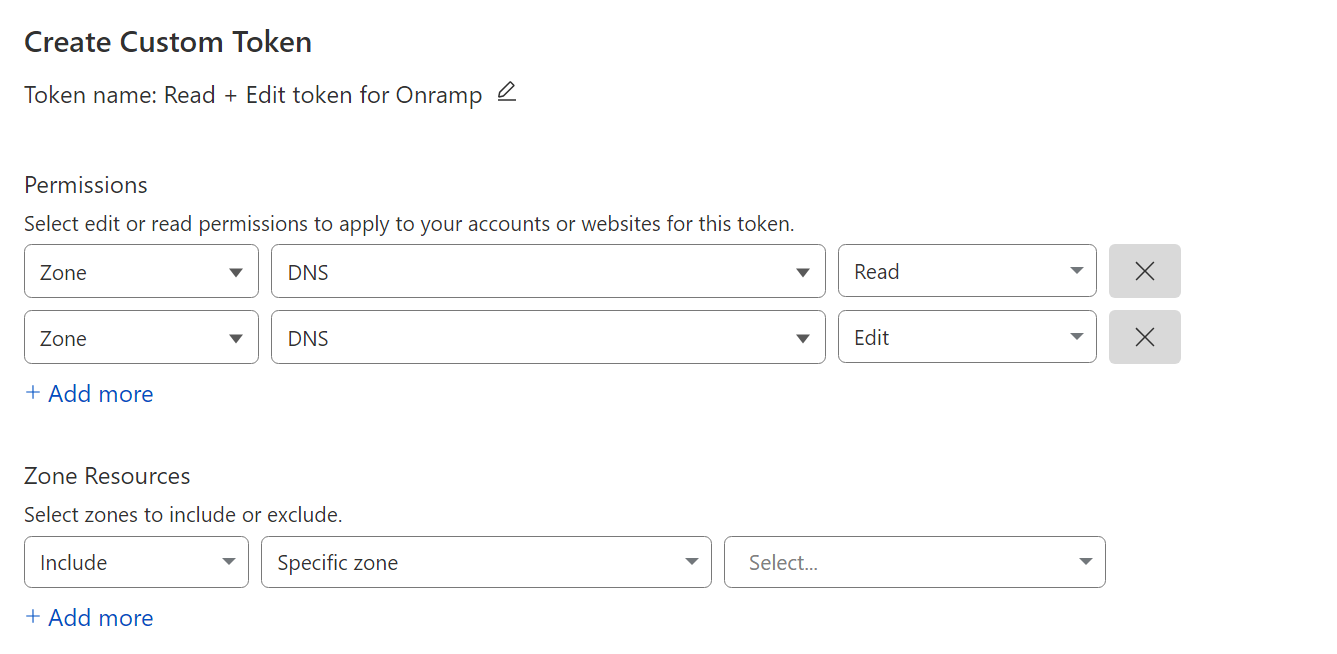
After getting your Cloudflare API key you can run the following to do the basic setup automagically:
sudo apt update
sudo apt install git make -y

sudo mkdir /apps
sudo chown -R $USER:$USER /apps
cd /apps
git clone -b main https://github.com/traefikturkey/onramp.git onramp
cd onramp

make install
Important: You must use
-b mainwhen cloning. Themasterbranch is legacy and no longer maintained. If you cloned without-b main, switch with:git checkout main && git pull
Note: If this is a fresh system without Docker,
make installwill automatically install Docker and add your user to the docker group. After installation completes, you'll need to runnewgrp docker(or log out and back in) to use Docker commands, then runmake continue-installto complete setup.
The install process includes an interactive wizard that will prompt you for:
- Server hostname and domain
- Timezone
- Cloudflare credentials
If you prefer to edit the configuration manually, you can skip the wizard and use:
make edit-env-onrampTo re-run the wizard later:
make env-wizardThen start the staging environment:
make start-stagingTraefik will start and attempt to obtain a staging certificate, wait and then follow the on screen directions.
make down-stagingYou are now ready to bring things up with the production certificates
makeOnRamp includes 287+ services in the ./services-available directory, each with comprehensive documentation including configuration details, environment variables, Docker images, port mappings, and available overrides.
Browse services:
- Service Documentation - Full documentation for all services
- SERVICES.md - Quick reference list with links
To list available services:
make list-servicesTo enable a service:
make enable-service uptime-kuma
make restart
Note: This creates a symlink in
./services-enabled/to the service config in./services-available/. A.envfile is auto-generated atservices-enabled/<service>.envfrom the template (if available).
To view service documentation:
# View full documentation with configuration details and overrides
cat services-docs/uptime-kuma.md

# Or browse all services
ls services-docs/
To disable a service:
make disable-service uptime-kuma
make restart
To create a new service:
make create-service name-of-serviceThis creates a file in ./services-available/ using the template from make.d/templates/service.template
OnRamp includes 109 override configurations that extend service functionality with features like:
- NFS storage - Mount media from NAS/NFS servers
- GPU acceleration - NVIDIA, AMD, Intel QuickSync support
- Dedicated databases - Dedicated Redis, PostgreSQL, MariaDB containers
- Extra configurations - Additional features and integrations
Each service's documentation lists available overrides. For example, see Plex overrides or Jellyfin overrides.
To list all available overrides:
make list-overridesTo view what an override does before enabling:
# Check the service documentation for override details
cat services-docs/plex.md  # Shows all Plex overrides
To enable an override:
make enable-override plex-nfs
make restart
To disable an override:
make disable-override plex-nfs
make restart
Note: Overrides create symlinks in
./overrides-enabled/pointing to configs in./overrides-available/. You can also place custom docker-compose files in./overrides-enabled/- they'll be included on startup and in backups.For more on Docker Compose overrides: https://docs.docker.com/compose/extends/#adding-and-overriding-configuration
If your media (movies, TV shows, downloads) lives on a NAS or NFS server:
1. Configure your NFS server and paths:
make edit-env-nfsSet at minimum:
NFS_SERVER=192.168.1.100          # Your NAS/NFS server IP
NFS_MEDIA_PATH=/mnt/media         # Base path on the NFS server
NFS_MOVIES_PATH=${NFS_MEDIA_PATH}/movies
NFS_SHOWS_PATH=${NFS_MEDIA_PATH}/shows
NFS_DOWNLOADS_PATH=${NFS_MEDIA_PATH}/downloads
2. Enable NFS overrides for your services:
make enable-override radarr-nfs
make enable-override sonarr-nfs
make enable-override plex-nfs
3. Restart:
make restartTroubleshooting: If you see
permission deniedordevice: "::"in mount errors, your.env.nfsis missing or has empty paths. Runmake edit-env-nfsand verifyNFS_SERVERand the path variables are set correctly. Also ensure your NFS server allows access from this machine's IP.
To see all available NFS overrides:
make list-overrides | grep nfsDocker based Game servers are included in the ./services-available/games directory. The configuration files include links to the web page for the services which has the available documentation.
To list available games:
make list-games
To enable a game:
make enable-game factorio
make restart
To disable a game:
make disable-game factorio
make restart
External services can also be proxied through Traefik to list the available configurations:
make list-external
They can be enabled by running the following commands:
make enable-external proxmox
make restart
And disabled with the following:
make disable-external proxmox
make restart
OnRamp uses convention-based scaffolding to auto-generate service configurations. When you enable a service that has templates in services-scaffold/, configs are automatically created in etc/<service>/.
See docs/scaffolding.md for details on:
- How to add scaffolding to a service
- Template file conventions
- The difference between
disable-serviceandnuke-service
Instead of complex High Availability (HA) setups (like Docker Swarm or Kubernetes) which can be overkill for a home lab, OnRamp encourages a "Disaster Recovery" (DR) approach. The goal is to be able to rebuild your entire stack from scratch in minutes using backups and automation.
The 3-2-1 Backup Strategy:
- 3 copies of your data
- 2 different media types
- 1 offsite copy
By backing up your configuration and using tools like Ansible to provision the base OS, you can restore your services quickly on new hardware if a failure occurs.
make create-backup
This will create onramp-config-backup-{hostname}-{timestamp}.tar.gz in the backups/ directory
scp ./backups/onramp-config-backup-*.tar.gz <user>@<other_host>:/apps/onramp/backups/
make restore-backup
Then you can run any of the following:
make          # does a docker compose up -d
make up       # does a docker compose up (this will show you the log output of the containers, but will not stay running if you hit ctrl-c or log out)
make down     # does a docker compose down
make restart  # does a docker compose down followed by an up -d
make logs     # does a docker compose logs -f
make update   # does a docker compose down, pull (to get the latest docker images) and up -d

# You can run multiple commands at once like this
make; make logs
OnRamp uses a modular environment system where configuration is split into separate files:
- Global config:
services-enabled/.env- Core settings (domain, Cloudflare credentials, timezone, etc.) - Service-specific:
services-enabled/<service>.env- Settings for individual services - NFS config:
services-enabled/.env.nfs- NFS mount settings (optional) - External services:
services-enabled/.env.external- External service proxy settings (optional)
make edit-env-onramp      # Edit global configuration
make edit-env <service>   # Edit service-specific config (e.g., make edit-env adguard)
make edit-env-nfs         # Edit NFS configuration
make edit-env-external # Edit external services configIf you open a service file, you'll see variables like ${UNIFI_DOCKER_TAG:-latest-ubuntu}:
UNIFI_DOCKER_TAGis the variable namelatest-ubuntuis the default value
Override by adding to the appropriate env file:
UNIFI_DOCKER_TAG=latest-ubuntu-beta
If you have an existing OnRamp installation with a monolithic .env file, the migration happens automatically on the first make command. Your old .env will be:
- Split into appropriate
services-enabled/*.envfiles - Backed up to
backups/.env.legacy - Removed
To preview what migration would do:
make migrate-env-dry-runPlease see https://docs.docker.com/compose/environment-variables/ for more information about environment variables in docker compose