
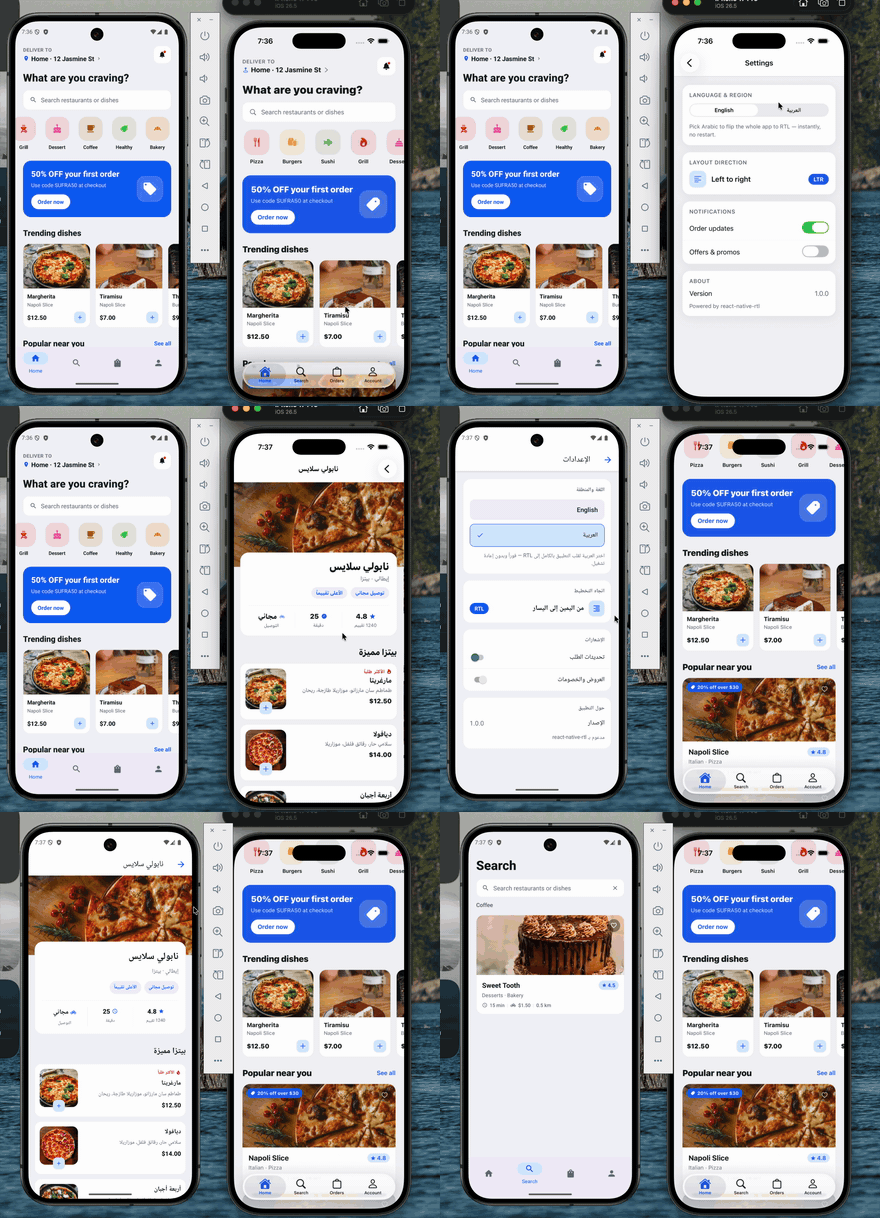
Flip your React Native app between LTR and RTL at runtime — no restart, no bundle reload, no remount. One call re-mirrors the whole UI and the native chrome (navigation header, native tab bar, and on iOS the edge swipe-back gesture), in place, keeping the user's navigation stack, scroll and form state intact.
The usual I18nManager.forceRTL(true) needs an app restart to take effect. This
package doesn't — it rides React Native's own re-layout paths (the ones a cold
start uses) to re-lay out every live Fabric surface, and mirrors the native
chrome alongside it. No node_modules patch, no navigator swap, no root-key
remount.
- Runtime flip — LTR ⇄ RTL without restarting.
- Native New Architecture (Fabric / bridgeless), iOS + Android.
- Autolinked — no
MainApplication/ Podfile edits. - Tiny API —
setRTL,applyLocaleDirection,isRTLLocale.
- React Native New Architecture (Fabric) — default on RN 0.76+ / Expo SDK 52+.
- A development build or bare app. This is native code, so it does not
run in Expo Go — use
expo prebuild+expo-dev-client. - iOS 13+ / Android with
android:supportsRtl="true"(the package's manifest merges this in for you; Expo sets it by default).
npm install react-native-rtl
# or: yarn add react-native-rtl
Rebuild the native app — the JS wrapper is a safe no-op until the native module is in the binary:
# bare React Native
cd ios && pod install && cd ..
npx react-native run-ios && npx react-native run-android

# Expo (development build)
npx expo prebuild
npx expo run:ios && npx expo run:android
Autolinks on both platforms — no manual native edits.
import { setRTL, applyLocaleDirection, isRTLLocale } from 'react-native-rtl';

await setRTL(true);   // flip to RTL, instantly
await setRTL(false);  // back to LTR

await applyLocaleDirection('ar'); // RTL (drive it from a locale)
await applyLocaleDirection('en'); // LTR

isRTLLocale('he-IL'); // true
setRTL also keeps JS-side I18nManager.isRTL in sync.
| Export | Signature | Description |
|---|---|---|
setRTL |
(isRTL: boolean, options?: SetRTLOptions) => Promise<boolean> |
Flip layout direction at runtime. Resolves to the applied direction. Safe no-op off-device / in Expo Go / tests. |
applyLocaleDirection |
(locale: string, options?: SetRTLOptions) => Promise<boolean> |
setRTL(isRTLLocale(locale), options). |
isRTLLocale |
(locale: string) => boolean |
Whether a BCP-47 tag / language code is right-to-left. |
| Option | Default | Description |
|---|---|---|
forceApplicationDirection |
true |
iOS only. Switch the application-wide layout direction, not just individual views. UIKit resolves every semanticContentAttribute relative to UIApplication.userInterfaceLayoutDirection — fixed at launch, no public setter — so forcing views alone leaves them as "RTL islands in an LTR app", which UIKit renders mirrored. On iOS 26 that mirrors the navigation bar's large title glyphs (Arabic reads backwards). Switching the app-wide direction removes the mismatch and UIKit lays out right-to-left natively. There is no public API for it, so this calls a private UIKit selector, guarded by respondsToSelector: with its argument type verified. Pass false to keep that selector out of your binary — the public per-window layout-direction trait override still applies, but iOS 26 large titles may render mirrored. |
Three things to wire up: cold start, the language switch, and (for RTL that follows your text and navigation) a couple of small conventions.
Do it before the first screen paints, so a relaunch in the stored language is already correct:
// app root (before rendering your navigator)
const lang = await getStoredLanguage();
await setRTL(isRTLLocale(lang));   // native flip + JS I18nManager
await i18n.changeLanguage(lang);Call setRTL before i18n.changeLanguage. The tree must be RTL when the
new text re-measures; otherwise the new text bakes its alignment while the tree
is still LTR.
async function changeLanguage(locale: string) {
  await setRTL(isRTLLocale(locale)); // 1. flip direction (native, no restart)
  await i18n.changeLanguage(locale); // 2. then swap the strings
}React Native only mirrors a <Text> / <TextInput> when its style sets
textAlign. Plain unset text stays natural — left on an LTR device, even
under forced RTL. Use textAlign: 'left': it is start-relative, so RN keeps
it left in LTR and flips it to right under RTL.
const styles = StyleSheet.create({
  title: { fontSize: 20, textAlign: 'left' },   // ✅ flips with direction
  body:  { fontSize: 15 /* no textAlign */ },    // ❌ stays left under RTL
});
Rows built with flexDirection: 'row' reverse automatically under RTL — no
change needed.
If you use Expo Router (or React Navigation without an explicit direction),
the native-stack push/pop animation and the swipe-back gesture read their
direction from LocaleDirContext, which defaults to
I18nManager.getConstants().isRTL — the cached startup constant. It never
updates at runtime, so pushed screens keep the old direction until a restart.
Override it with a value that tracks your language state:
import { LocaleDirContext } from '@react-navigation/native';

function RootLayout() {
  const language = useLanguageStore((s) => s.language);
  const direction = isRTLLocale(language) ? 'rtl' : 'ltr';

  return (
    <LocaleDirContext.Provider value={direction}>
      <Stack /* … */ />
    </LocaleDirContext.Provider>
  );
}
(Plain React Navigation: pass direction to NavigationContainer and re-render
it on language change instead.)
setRTL(isRTL) first keeps JS coherent (I18nManager.allowRTL(true) +
forceRTL(isRTL)), then calls the native module, which runs on the main thread
in a single pass:
- iOS — flip
RCTI18nUtilflags → postUIContentSizeCategoryDidChangeNotificationso everyRCTFabricSurfacestores the newlayoutDirection→ bust Yoga's size-keyed layout cache by nudging each surface's size 1 pt and restoring it (forces a real re-layout in the new direction) → switch the app-wide layout direction so UIKit's own chrome mirrors natively instead of being rendered as a mirrored LTR layout (plus the publictraitOverrides.layoutDirectionon every window) → mirrorUITabBarand the navigation controllers'semanticContentAttributeand re-arm theinteractivePopGestureRecognizer. On iOS 26 it also turns off large-title reparenting at load, so the title stays in the navigation bar instead of being donated to RN's mirrored scroll view (see below). - Android — flip
I18nUtilflags →forceLayout()+requestLayout()on everyReactSurfaceView(re-runsonMeasure→updateLayoutSpecs→constraintLayout, re-readingisRTL) → set the decor viewlayoutDirection.
Full deep-dive with exact RN source paths:
RTL_RUNTIME_NATIVE.md.
| Symptom | Cause / fix |
|---|---|
| Nothing happens at all | Native module not in the binary — rebuild the app (pod install + run). It no-ops in Expo Go. |
| Only flips after a restart | You're on the New Architecture? Confirm newArchEnabled. Make sure you await setRTL(...) (it re-lays out live surfaces). |
| Text doesn't right-align | Add textAlign: 'left' to that text style (see step 3). Unset alignment never flips on an LTR device. |
| Text flips but shows old strings' alignment | Call setRTL before i18n.changeLanguage (step 2). |
| Push animation / swipe-back keep old direction | Override LocaleDirContext (step 4). |
| iOS 26 large title renders mirrored / reversed | Two causes, both handled by the library — if you see it again, check neither was defeated. (1) The app-wide direction switch was skipped: you passed forceApplicationDirection: false, or the private selector is unavailable on that OS build. (2) Large-title reparenting is back on: iOS 26 donates the large title to the scroll view it tracks, and React Native mirrors its scroll views with a scaleX(-1) transform, so the donated title gets flipped once and renders backwards on the wrong side. The library disables reparenting (DisableLargeTitleReparenting, in UIKit's own defaults suite) when it loads; setting that key back to NO, or writing it to the app's own defaults domain instead of the suite, brings the bug back. |
iOS 26 note. Disabling reparenting means the large title behaves as it did on iOS 18 — it stays in the navigation bar and collapses into the inline title on scroll, rather than scrolling with the content. That trade is what keeps Arabic large titles from rendering backwards in a runtime-flipped app.
A runnable Expo app lives in example/ — Sufra, a full
food-delivery UI (the screen in the GIF above). It shows the flip holding up
across a real app: native bottom tabs (expo-router NativeTabs), screens
pushed outside the tabs (restaurant detail, a cart modal, checkout, and
settings) with native headers, back buttons and the iOS edge swipe-back all
mirroring, a shared cart, a @expo/ui SwiftUI control, and English ⇄ Arabic
switching that re-mirrors every price, rating and layout in place. See
example/README.md.
cd example
npx expo prebuild --clean
npx expo run:ios # or: npx expo run:androidMIT © Saleh Ayman