








A local-only dog activity tracker for Home Assistant. Log walks, bathroom breaks, meals, medications, weight, and more — all stored privately in your HA instance with no cloud dependency.
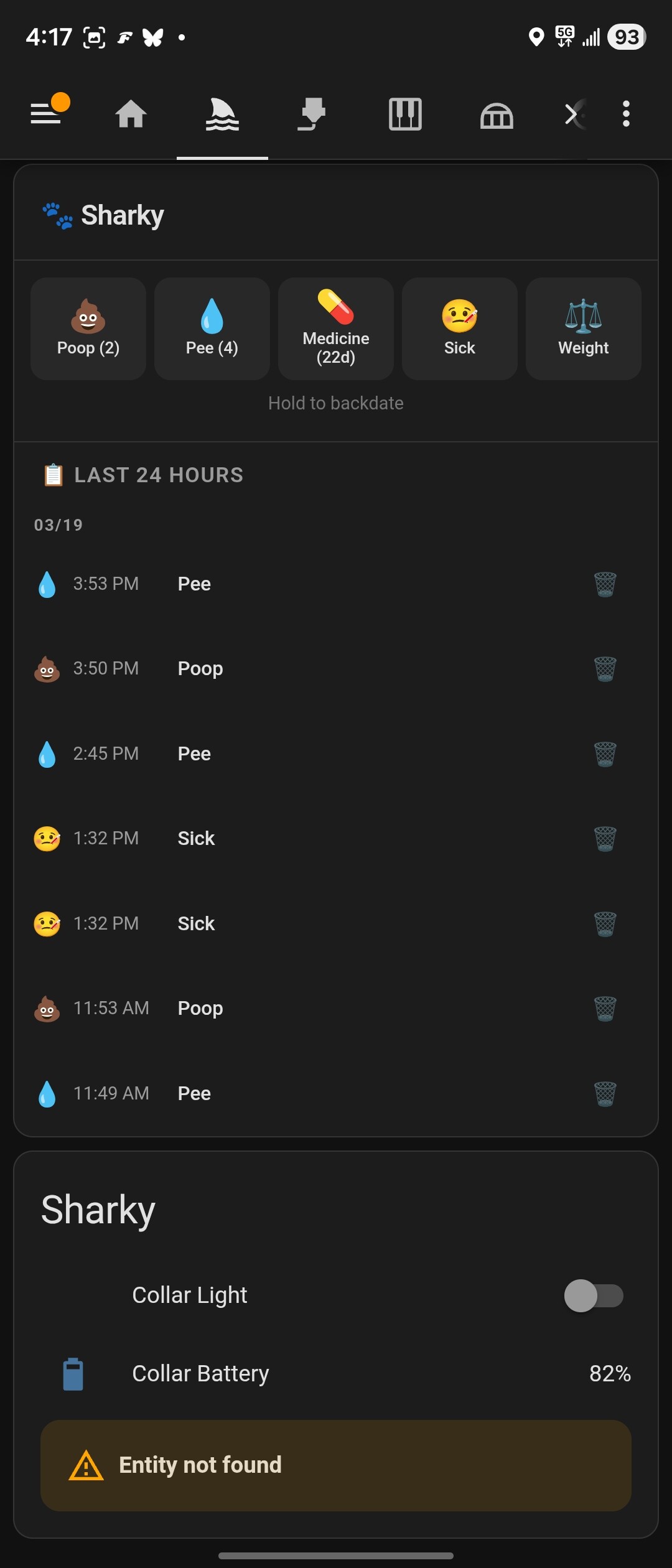
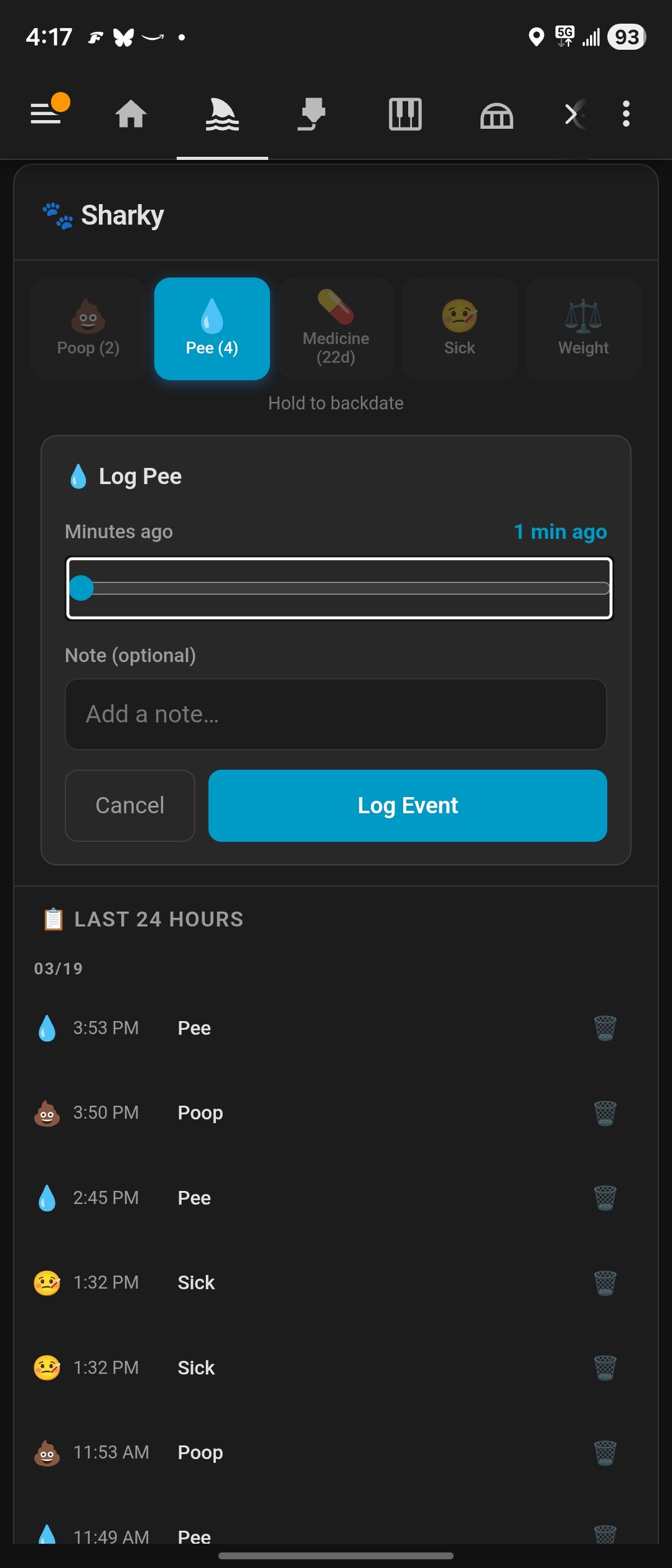
- Local storage only — all data stored in HA's
.storagedirectory, no cloud accounts or tokens required - Per-event sensors — most-recent timestamp for each event type (pee, poop, medicine, walk, food, treat, water, grooming, training, sleep, weight, vaccine, sick)
- Daily count sensors — today's counts for common event types (resets at local midnight)
- Days-since-medicine sensor — track medication intervals for automation reminders
- Weight sensor — track your dog's weight over time
- Pawsistant Card — built-in Lovelace card auto-registers on install; log events, view the full event timeline with infinite scroll, and track stats without leaving the dashboard
- Pawsistant Button Card — separate card for placing quick-log buttons anywhere on your dashboard. Multiple buttons per card, configurable grid (2–6 per row), add/remove/reorder in the visual editor. Tap opens backdate form, long-press logs instantly with haptic feedback
- Haptic feedback — long-press on any Pawsistant card triggers native haptics in HA Companion (Taptic Engine on iOS, system haptics on Android)
- Multi-dog support — add and remove dogs via services at any time
- Timezone-aware — daily counts use your HA instance's local timezone
Pawsistant is in the default HACS store.
- Open HACS and search for Pawsistant
- Install it
- Restart Home Assistant
- Copy
custom_components/pawsistant/into your HA config'scustom_components/directory - Restart Home Assistant
- Go to Settings → Devices & Services → Add Integration
- Search for Pawsistant
- Enter your first dog's name (required), breed, and birth date (both optional)
- HA creates sensors for your dog and auto-registers the Pawsistant card as a Lovelace resource
If you also run the Home Keeper task tracker, Pawsistant's options (Settings → Devices & Services → Pawsistant → Configure → Manage care schedules) let you attach a recurring schedule to any pet activity — nail trims, medicine, grooming, etc.
Pawsistant creates the matching recurring task in Home Keeper (attached to the pet's device) and keeps the two in sync: logging the activity in Pawsistant marks the Home Keeper task done, and completing the task in Home Keeper logs the activity in Pawsistant — so they behave like the same button. The option only appears when Home Keeper is installed.
Mistakes travel too. Marked the medicine done when you hadn't? Undo the completion in Home Keeper and the logged entry disappears from Pawsistant; delete the entry from the Pawsistant timeline and the Home Keeper completion goes with it. Editing an entry's time moves the completion to match. If the two ever drift apart — an undo while Home Assistant was restarting, say — Pawsistant tidies up on the next start, and only ever touches entries it logged on Home Keeper's behalf, never one you logged yourself.
A new cadence replaces the task. Home Keeper locks the cadence of the task, also against Pawsistant. When a care schedule's cadence changes, Pawsistant replaces the task on the next start. The new task keeps the last done date. The old task's completion history in Home Keeper is lost, but every entry stays in the pet's log. A new pet or activity name alone does not replace the task, because a name is not worth that history.
One export for both. Pawsistant joins Home Keeper's export and import. Home
Keeper's export file then also holds your pets, event types, button settings, care
schedules and all logged events. Import that file on a new install and Pawsistant adds
or updates its records; it never deletes a record that is not in the file. Pawsistant
then makes the Home Keeper tasks of the care schedules again. See
pawsistant.export_data and
pawsistant.import_data.
Pawsistant also announces itself to Home Keeper so it appears under Home Keeper's Settings → Companions section, with a Configure link to Pawsistant's settings page (where the care schedules above live) — so if you have both, you'll discover they pair up from either side.
An event type can use a supply that Home Keeper counts, such as poop bag rolls or medicine tablets. Each log of that type takes a set amount off the count. When the count reaches its reorder point, Home Keeper adds a Buy task to your shopping list. Tick that task at the store and Home Keeper adds the pack size back.
Two common setups:
- Poop bag rolls. Add a custom event type Roll with the supply Poop bag rolls, 1 per log. Tap Roll when you put a new roll on the leash. Poop logs do not change the count, so it stays correct when you use someone else's bag.
- Medicine. Add a custom event type for each medicine, such as Carprofen, with the supply Carprofen 75 mg and 1 tablet (or 0.5) per log. It can keep its care schedule and its Days since number. Home Keeper takes the dose when the task is completed, from Pawsistant or from Home Keeper, and gives it back on an undo.
Set a supply in the card: open ⚙️, edit the event type, and fill in Uses a supply (the supply name, the amount per log, the count now, the reorder point, the unit and the pack size). Each supply is a part of one Pet supplies appliance in Home Keeper. You own the counts; Pawsistant owns the appliance name and its list of parts.
On the card, a button that uses a supply shows the count in its corner. The badge is amber at the reorder point and red at 0. The log form shows what the log takes, and a toast after a log shows what is left, with Undo. The 📦 button in the card header opens Supplies, where anyone can correct a count or add a pack.
Supplies need Home Keeper 0.27.0b5 or newer. If you remove Pawsistant, it hands a counted Pet supplies appliance over to you in Home Keeper, with your counts.
The Pawsistant card is automatically registered when the integration loads. Add it to any dashboard:
type: custom:pawsistant-card
dog: Sharky
Card features:
- Quick-log buttons (tap to log now, hold to backdate)
- Weight logging form with configurable unit (lbs/kg)
- Full event timeline with infinite scroll, inline edit and delete
- Stats row: pee count, poop count, days since medicine
Card config options:
| Key | Default | Description |
|---|---|---|
dog |
(required) | Dog's display name (must match the name used in services) |
shown_types |
['poop','pee','medicine','sick','weight'] |
Which event-type buttons to show |
weight_unit |
lbs |
Weight unit: lbs or kg |
timeline_entity |
auto-detected | Override timeline sensor entity ID |
pee_count_entity |
auto-detected | Override pee count sensor entity ID |
poop_count_entity |
auto-detected | Override poop count sensor entity ID |
medicine_days_entity |
auto-detected | Override days-since-medicine sensor entity ID |
weight_entity |
auto-detected | Override weight sensor entity ID |
Almost always this is the new Overview dashboard, not a broken install.
Home Assistant 2026.x boots you into a redesigned Overview (the home panel, at
/home/overview). It is not a Lovelace dashboard — it builds itself from your
areas and summaries, and it never loads Lovelace resources. No custom card from
any integration can appear there, so pawsistant-card is invisible on it and
absent from its editor. A fresh 2026.x install may also ship with no classic
dashboard at all, leaving nowhere obvious to put the card.
The fix is to use a Lovelace dashboard:
- Settings → Dashboards → + Add dashboard → New dashboard from scratch.
- Open it, click ✏️ (edit) → + Add card, and search for Pawsistant.
If it's still missing on a real Lovelace dashboard, check the registration —
Settings → Devices & services → Pawsistant → ⋮ → Download diagnostics and
look at the card_registration block:
-
resource_registered: trueandcard_file_exists: truemeans the card is installed and served correctly; you're on a non-Lovelace dashboard. -
lovelace_dashboards: []means you have no classic dashboard yet — create one as above. -
resource_mode: "yaml"means your Lovelace runs in YAML mode, so the integration can't self-register. Add the resource yourself:lovelace: resources: - url: /pawsistant/pawsistant-card.js type: module
Then hard-refresh the browser (Ctrl/Cmd-Shift-R) to clear the cached bundle.
Log an activity for a dog.
| Field | Required | Description |
|---|---|---|
dog |
✅ | Dog name (case-insensitive) |
event_type |
✅ | One of: poop, pee, medicine, sick, food, treat, walk, water, sleep, vaccine, training, weight, grooming, teeth_brushing |
note |
— | Optional note |
value |
— | Numeric value (required for weight events; lbs) |
timestamp |
— | ISO 8601 timestamp for backdating; defaults to now |
log_event returns {event_id} when you ask for a response.
Set the count, reorder point, unit or pack size of the supply an event type uses.
| Field | Required | Description |
|---|---|---|
event_type |
✅ | The event type that uses the supply |
stock |
— | How many you have now |
reorder_at |
— | The count at which Home Keeper adds a Buy task |
unit |
— | What the count is in, e.g. roll or tablet |
pack_size |
— | How many to add when you tick the Buy task |
Set the supply itself with the supply field of pawsistant.add_event_type or
pawsistant.update_event_type: {"name": "Poop bag rolls", "amount": 1}, or null to
stop using one.
Delete an event by ID.
| Field | Required | Description |
|---|---|---|
event_id |
✅ | Event ID (available in sensor extra_state_attributes) |
Register a new dog (triggers integration reload to create sensors).
| Field | Required | Description |
|---|---|---|
name |
✅ | Dog's name |
breed |
— | Breed |
birth_date |
— | Birth date (YYYY-MM-DD) |
Remove a dog and all associated events. Administrators only.
| Field | Required | Description |
|---|---|---|
dog |
✅ | Dog name (case-insensitive) |
Query events for a dog. Returns data via service response (response_variable).
| Field | Required | Default | Description |
|---|---|---|---|
dog |
✅ | Dog name | |
event_type |
— | all types | Filter by event type |
days |
— | 7 |
Number of past days to include |
Example automation:
action:
  - service: pawsistant.list_events
    data:
      dog: Sharky
      event_type: medicine
      days: 30
response_variable: medicine_eventsBulk-import events from a JSON array (for migrating from other systems). Administrators only.
| Field | Required | Description |
|---|---|---|
events |
✅ | List of event dicts with keys: event_type, timestamp, dog_id, note, value |
Return all data as 1 document, through the service response. Administrators only. Home Keeper calls this action for its combined export.
| Field | Required | Description |
|---|---|---|
files_dir |
— | Set by Home Keeper for a bundle export. Pawsistant has no files and does not use it. |
The response is {format, version, data, skipped}. data has these keys:
| Key | Contents |
|---|---|
format |
The document format, now 1 |
dogs |
List of {id, name, breed, birth_date, species} |
event_types |
Your event type changes (null marks a deleted built-in type) |
button_metrics |
Your button metric changes |
shown_types |
{dog id: [event types]}: the buttons each pet shows |
care_schedules |
List of {id, dog_id, event_type, recurrence_type, interval, unit or freq, anchor}, with no Home Keeper task id |
events |
All events of all years, newest first: {id, dog_id, event_type, timestamp, note, value} |
Add or update the records of a document from export_data. Administrators only.
| Field | Required | Description |
|---|---|---|
document |
✅ | The data from export_data (you can edit it first) |
dry_run |
— | true checks the document and returns the report, but writes nothing |
files_dir |
— | Set by Home Keeper for a bundle import. Not used. |
- A pet matches by id, then by name. A care schedule matches by id, then by pet and event type. An event matches by id, so an import of the same file 2 times adds no duplicates.
- A record that is not in the document stays.
- The response is
{ok, dry_run, counts, records, problems}. Each problem is{level, path, message}, for exampleevents[2].dog_id. 1errorstops the full import, and nothing is written. - After an import, Pawsistant fires the
pawsistant_data_importedevent with the counts.
For a dog named Sharky, the following entities are created:
| Entity | Description |
|---|---|
sensor.sharky_most_recent_pee |
Timestamp of last pee event |
sensor.sharky_most_recent_poop |
Timestamp of last poop event |
sensor.sharky_most_recent_medicine |
Timestamp of last medicine event |
sensor.sharky_most_recent_walk |
Timestamp of last walk |
sensor.sharky_most_recent_food |
Timestamp of last meal |
sensor.sharky_daily_pee_count |
Pee events today |
sensor.sharky_poop_count_today |
Poop events today |
sensor.sharky_daily_walk_count |
Walks today |
sensor.sharky_weight |
Most recent weight (lbs) |
sensor.sharky_days_since_medicine |
Days since last medicine event |
sensor.sharky_recent_timeline |
Count + list of events in last 24h |
Events are stored in HA's .storage directory:
.storage/pawsistant— dog registry (names, breeds, IDs).storage/pawsistant_events_YYYY— events partitioned by year
No external database, no cloud sync, no tokens.
MIT