A zero-config Docker sandbox that boots straight into Claude Code — pre-loaded with the exact toolchain your build needs, so you just vibe and ship.


Get cooking · Why it slaps · Loadouts · Lock it in a VM

Neovim + LSP, tmux and zsh under the hood — see it below.
You know the move: let the agent run wild and actually get stuff done — but
not on your real machine. So give it its own. One command drops Claude into a
disposable container with --dangerously-skip-permissions fully on, a real IDE
under the hood (Neovim + LSP, tmux, zsh), and a profile that's already got
the entire toolkit for what you're building. Laptop stays pristine. Box gets
nuked on exit. You just talk.
No build step, no setup ritual — install the wrappers once, then they pull prebuilt images from Docker Hub on demand.
Install — clone to ~/.dev and drop the wrappers on your PATH:
git clone https://github.com/nemanjan00/dev-environment ~/.dev
export PATH=$PATH:~/.dev/bin

echo "export PATH=\$PATH:$HOME/.dev/bin" >> ~/.zshrc
echo "export PATH=\$PATH:$HOME/.dev/bin" >> ~/.bashrc
Run — from any project directory:
claude login                    # once (or export ANTHROPIC_API_KEY=sk-...)

claude-docker                   # sandboxed Claude, dropped into your project
claude-docker --profile ctf     # ...packing a full binary-exploitation kit
Your project's mounted, your auth + git identity tag along, and Claude is live in a throwaway box. Close it and it's gone.
The wrappers self-update on launch (
git pull --ff-onlyon~/.dev) so you always run the latest profiles and tooling — setDEV_NO_UPDATE=1to skip it.
- 🧰 Loadouts, not setup. Ten ready-made profiles —
reversing,android,embedded,maker,analyst,librarian,presenter,scraper,ctf, or plaindefault. Each stacks on one shared base, so swapping toolchains is a single--profileflag, not an afternoon. - 🔒 Send it — safely. Claude runs unleashed because it's sandboxed; your
host never feels it. Want it spinning up its own containers too?
claude-vmwraps the whole thing in a throwaway VM. - 🧠 The box explains itself. Every image ships a
/work/CLAUDE.mdand each profile appends its own playbook — some even auto-load Claude skills (thectfprofile hands Claude a ready-to-go/pwnworkflow). Less prompting, more shipping. - ⚡ Zero-config, zero residue.
claude loginonce and the wrapper handles auth, config, and git. No toolchains pollute your machine, and the container itself is--rm'd on exit — the only host writes are your project and Claude's own config (so sessions and memory carry over). - 🖥️ Slaps without Claude too. It's a legit portable IDE — Neovim + LSP, tmux, zsh, asdf Node/Python — even with the AI switched off.
Three moving parts, zero ceremony:
claude-dockerruns the image, mounts your current directory at/work/project, and copies in your Claude auth + git config. It launchesclaude --dangerously-skip-permissionsinside tmux — pulling the latest image first, so you're always current.- The image is Arch-based: a shared
baselayer (Neovim, tmux, zsh, asdf Node/Python, Claude Code) plus a thin profile layer that adds the domain tools. Each profile also appends its own docs to/work/CLAUDE.md, so Claude knows what's installed and how to drive it. - Nothing leaks. No toolchains land on your host, and the container is
--rm'd on exit — the only things written back are your project and Claude's own config dir (so your sessions and memory persist). Need harder isolation — say, Docker-in-Docker —claude-vmruns the same image inside an ephemeral Vagrant/libvirt VM that's destroyed on exit.
- Get cooking
- Why it slaps
- How it works
- Build it
- Profiles
- Run it
- Opening project inside of it
- Claude Code
- VM isolation
- Components
- Supported languages
- Author
# Build base image
docker build -t nemanjan00/dev:base .

# Build a profile (default, reversing, etc.)
docker build -t nemanjan00/dev:default profiles/default/
docker build -t nemanjan00/dev:reversing profiles/reversing/
docker build -t nemanjan00/dev:embedded profiles/embedded/
docker build -t nemanjan00/dev:android profiles/android/
docker build -t nemanjan00/dev:maker profiles/maker/
docker build -t nemanjan00/dev:analyst profiles/analyst/
docker build -t nemanjan00/dev:librarian profiles/librarian/
docker build -t nemanjan00/dev:presenter profiles/presenter/
docker build -t nemanjan00/dev:scraper profiles/scraper/
docker build -t nemanjan00/dev:ctf profiles/ctf/

# With custom UID/GID (to match your host user) — apply to the base image
docker build --build-arg UID=$(id -u) --build-arg GID=$(id -g) -t nemanjan00/dev:base .Think of a profile as a loadout. A shared nemanjan00/dev:base layer carries the common kit (zsh, Neovim, tmux, Node.js, Python, Claude Code); each profile stacks the domain tools on top. Because they share that base, switching loadout is one --profile flag and a small incremental pull — never a fresh multi-gigabyte download.
| Profile | Tag | Description |
|---|---|---|
default |
nemanjan00/dev:default |
Base environment, no extras |
reversing |
nemanjan00/dev:reversing |
Reverse engineering & forensics: radare2, r2ghidra, r2mcp, jadx, binwalk, apktool, volatility3, unicorn, keystone, magika, wireshark-cli, foremost |
embedded |
nemanjan00/dev:embedded |
Embedded development: arm-none-eabi toolchain, platformio, avrdude, esptool, openocd, stlink, sigrok-cli, flashrom |
android |
nemanjan00/dev:android |
Android / LineageOS builds: repo, git-lfs, JDK 17/11, android-tools, ccache, multilib libs, AOSP host toolchain |
maker |
nemanjan00/dev:maker |
Physical-world maker: OpenSCAD for 3D-printable parts, bun + pre-installed tscircuit CLI for PCB design |
analyst |
nemanjan00/dev:analyst |
Data / infra analyst (extends reversing): aws-cli, s3cmd, rclone, psql, mariadb, sqlite, duckdb, valkey-cli, rabbitmq admin, lnav, httpie, protoc, dig |
librarian |
nemanjan00/dev:librarian |
Document & ebook reading: pandoc, poppler (pdftotext), mupdf-tools, qpdf, pdfgrep, catdoc, djvulibre, unrtf, tesseract OCR, glow, w3m |
presenter |
nemanjan00/dev:presenter |
Slide decks from Markdown via pandoc → beamer → xelatex: pandoc-cli, texlive (xetex, latexextra, fontsextra, pictures), fontconfig, Hack Nerd Font |
scraper |
nemanjan00/dev:scraper |
Web scraping against anti-bot sites: CloakBrowser (stealth Chromium, Playwright/Puppeteer drop-in), Xvfb for headed mode, Chromium runtime libs, full font set |
ctf |
nemanjan00/dev:ctf |
Binary exploitation / CTF (extends reversing): pwntools, GEF, ROPgadget, one_gadget, seccomp-tools, patchelf — plus an auto-loaded pwn exploitation skill |
To use a profile with the CLI scripts:
claude-docker --profile reversing

claude-vm --profile reversingAdd a directory under profiles/ with a Dockerfile that extends the base image:
FROM nemanjan00/dev:base

USER 0
RUN pacman -Syu --noconfirm your-packages-here
USER 1000
CI builds and pushes every profile from .github/workflows/build.yml: base-derived profiles go in the build matrix, while a profile that extends another profile gets its own job chained with needs: (see ctf/analyst). Add your profile there so it ships.
If the profile needs extra bind mounts or env vars at runtime (e.g. a persistent ccache for Android builds), add an executable docker-args.sh in the profile directory. claude-docker runs it when the profile is selected and appends its stdout to the docker run arguments:
#!/bin/bash
# profiles/myprofile/docker-args.sh
mkdir -p "$HOME/.cache/myprofile"
echo "-v $HOME/.cache/myprofile:/work/.cache/myprofile"Skip the wrapper and you've still got a self-contained IDE — Neovim, tmux, and zsh in a throwaway container:
docker run -ti nemanjan00/dev:default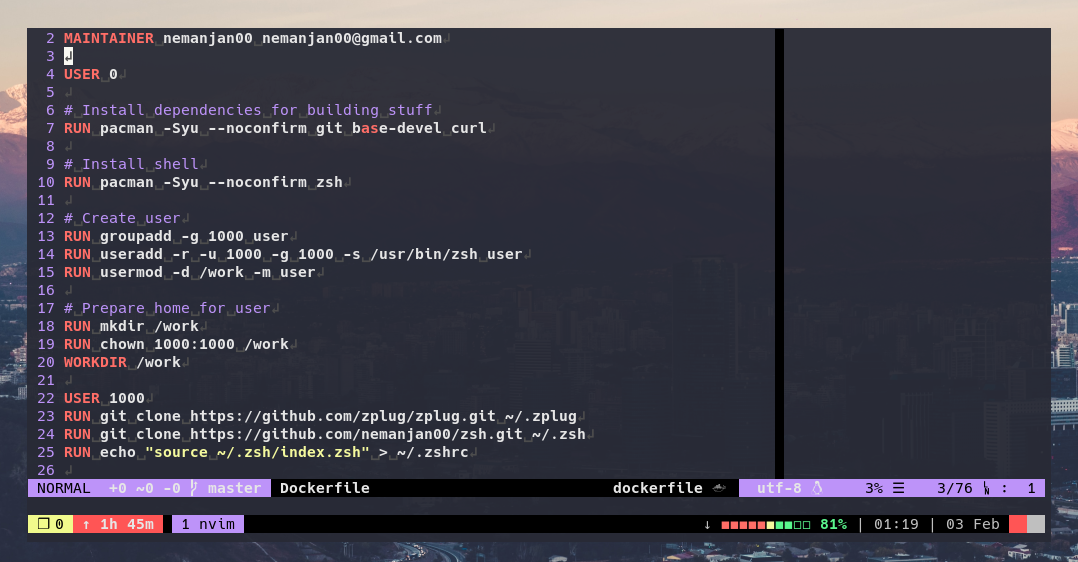
Mount your code at /work/project and drop straight into a tmux session on it:
docker run -ti -eTERM=xterm-256color -v$(pwd):/work/project nemanjan00/dev:default zsh -ic "cd project ; tmux"Claude Code is pre-installed. The quickest way to get started is with the CLI scripts:
# Direct Docker — simple, no VM overhead
claude-docker

# VM-isolated — Claude gets its own Docker daemon, fully sandboxed
claude-vm
Both scripts auto-detect and mount ~/.claude.json (OAuth), ~/.claude/ (config), and ~/.gitconfig into the container. Claude runs with --dangerously-skip-permissions since the environment is sandboxed.
# API key (works with both scripts)
ANTHROPIC_API_KEY=sk-... claude-docker

# OAuth — just run `claude login` on the host first, then:
claude-docker # ~/.claude.json is mounted automatically| Host path | Container path | Purpose |
|---|---|---|
~/.claude.json |
/work/.claude.json |
OAuth credentials (from claude login) |
~/.claude |
/work/.claude |
Full Claude config (settings, memory, CLAUDE.md) |
~/.gitconfig |
/work/.gitconfig |
Git identity and settings (read-only) |
The container ships with a /work/CLAUDE.md that documents the environment for Claude. Profile images append profile-specific tool documentation to it. Since Claude Code walks up from the project directory, /work/CLAUDE.md is always loaded as an ancestor of /work/project/. Your project can still have its own CLAUDE.md — both will be read.
Frontend developers who need container ports (e.g. dev servers) accessible on the host can enable host networking:
claude-docker --host-networkThis passes --network host to Docker, so any ports the container listens on are directly available on localhost.
# Minimal
docker run -ti -e ANTHROPIC_API_KEY -v$(pwd):/work/project nemanjan00/dev:default zsh -ic "cd project ; claude"

# Full setup
docker run -ti -e ANTHROPIC_API_KEY \
  -v$(pwd):/work/project \
  -v~/.claude:/work/.claude \
  -v~/.claude.json:/work/.claude.json \
  -v~/.gitconfig:/work/.gitconfig:ro \
nemanjan00/dev:default zsh -ic "cd project ; claude"For full isolation (e.g. giving Claude access to Docker), use claude-vm to run the dev container inside a lightweight VM via Vagrant + libvirt. Each invocation creates an ephemeral VM that is destroyed on exit.
# Arch Linux
pacman -S vagrant libvirt qemu-full qemu-img
vagrant plugin install vagrant-libvirt# Run from your project directory — it gets mounted into the VM
cd /path/to/project
claude-vm
# With API key
ANTHROPIC_API_KEY=sk-... claude-vmBy default, claude-vm auto-detects ~/.claude.json, ~/.claude/, and ~/.gitconfig. You can override with env vars:
| Env var | Default | Purpose |
|---|---|---|
PROJECT_DIR |
$(pwd) |
Project directory to mount |
CLAUDE_CONFIG_DIR |
~/.claude |
Claude config (settings, memory) |
CLAUDE_AUTH |
~/.claude.json |
OAuth credentials file |
ANTHROPIC_API_KEY |
(none) | API key authentication |
VMs are ephemeral — each claude-vm invocation gets a unique VM ID and cleans up on exit (including Ctrl-C). Multiple instances can run in parallel.
The container inside the VM has access to the VM's Docker socket (with correct group permissions via --group-add), so Claude can spin up additional containers as needed, fully isolated from the host.
Host (your machine)
└── Vagrant/libvirt VM (Alpine Linux, 4GB RAM, 2 vCPUs)
    ├── Docker daemon
    └── dev container (this image)
        ├── Claude Code (--dangerously-skip-permissions)
        ├── Docker CLI → VM's Docker socket
        ├── Neovim, tmux, zsh
        └── Project files (virtiofs mount)
Project files are mounted into the VM via virtiofs (native libvirt filesystem passthrough), so changes are reflected in both directions. The dev container cannot affect the host.
If vagrant up fails with dnsmasq: failed to create listening socket ... Address already in use, you have something bound on port 53 that conflicts with libvirt's DHCP. Run sudo claude-vm-setup to create a custom network with DNS disabled.
The base image — what every profile and the standalone IDE are built on:
- Neovim with my config and coc.nvim for LSP
- zsh with zplug and my config
- tmux with gpakosz/.tmux
- asdf version manager (Node.js, Python pre-installed)
- fzf fuzzy finder
- ripgrep fast search
- jq JSON processor
- ctags code indexing
- CSS
- Dockerfile
- HTML (with emmet support)
- JS (eslint and tsserver)
- JSON
- PHP
- Python
- Bash
- SQL
- VimL
- XML
- YAML
- Much more (via coc.nvim extensions)
Install it, then from any project directory:
claude-docker --profile ctf # or reversing, android, maker, analyst, ...Sandboxed Claude, fully loaded, gone on exit. If it spared your real machine a bad day, drop a ⭐ — it's free.