
Multi-drone navigation and obstacle avoidance in ROS 2, PX4, and Gazebo.
This project simulates a configurable swarm of VTOL drones. A coordinator accepts drones, assigns mission targets, and monitors progress. Each drone has its own flight and navigation stack: 3D LiDAR feeds an Artificial Potential Field (APF) safety layer that adjusts movement around obstacles before commands reach PX4. A browser dashboard provides mission planning, live telemetry, GPS mapping, and per-drone controls.
Built for ROS 2 Jazzy · PX4 SITL · Gazebo Harmonic. The Docker workflow runs the full simulation without a native ROS/PX4 installation.
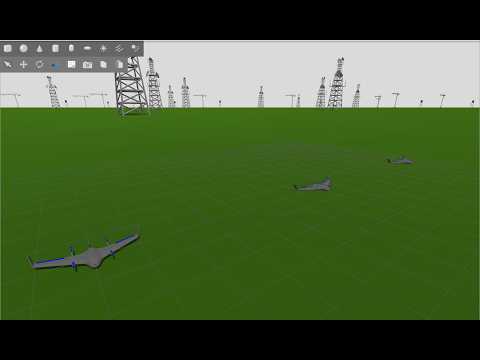
- Independent drone brains: each vehicle has its own PX4 instance, ROS namespace, navigation actions, LiDAR processing, and APF obstacle avoidance.
- Swarm missions: a coordinator approves joining drones, assigns targets, previews routes, and recalculates them as the mission changes.
- Mission Control dashboard: plan targets on local XYZ or GPS maps, inspect routes and telemetry, and send flight or gimbal commands to one drone or the fleet.
- Shared 3D map: per-drone LiDAR contributions feed a fused OctoMap, visualized in RViz.
- Flight safety: battery monitoring, return-home behavior, and explicit stop and landing controls are part of the simulation stack.
- Repeatable experiments: Docker pins the ROS/PX4 environment; Optuna tools support APF parameter studies and replay.
The control path is:
Dashboard → swarm coordinator → assigned drone → navigation → APF safety → PX4 gateway → PX4 SITL
                                                       ↑
LiDAR → local obstacle data ────────────────────────────┘
      └→ per-drone and global OctoMap → RViz
The default run spawns three drones. You can choose another count without editing launch files or rebuilding the image.
You need a Linux computer, Docker Engine, and the Docker Compose plugin. For Gazebo and RViz windows, use a local X11/XWayland session. Install Docker using the official Ubuntu instructions and verify that both commands work:
docker --version
docker compose version
If Docker reports a daemon permission error, follow its Linux post-installation steps. The Docker guide has the full Ubuntu setup, GPU options, storage configuration, and troubleshooting steps.
Clone this repository and start the simulation:
git clone --branch dynamic-apf-sector --single-branch \
  https://github.com/dgkagkan/drone-apf-navigation.git
cd drone-apf-navigation
cp .env.example .env
./scripts/run_docker.sh 3
On the first run, the launcher downloads dependencies and builds the Docker
image locally; a prebuilt image is not required. Later runs reuse that image.
The final number is the drone count: use ./scripts/run_docker.sh 5 for five
drones. Rendering is selected automatically for NVIDIA, Intel/AMD, or software.
When the dashboard reports Coordinator online, open http://127.0.0.1:8765. Approve any drones waiting in Settings → Pending drones before controlling them through the coordinator.
To try a mission, arm and take off the desired drones, add map targets, press CALCULATE to preview the assignments, then press START MISSION. The dashboard keeps active targets visible alongside new pending targets. You can switch between XYZ, GPS/compass, and the geographic map; set a GPS origin in Settings before using coordinates from a different real-world location.
Stop with Ctrl+C in the launcher terminal, then:
docker compose downUseful variants:
# Rebuild after changing or pulling source code
./scripts/run_docker.sh 3 --build

# Run without Gazebo/RViz windows
DRONE_HEADLESS=true DRONE_USE_RVIZ=false ./scripts/run_docker.sh 3
Runtime settings and GPS origins are stored outside the container in
docker-data/settings, so applied settings survive container recreation.
Photos and recordings are stored in docker-data/photos and
docker-data/recordings. See Docker workflow for the
corresponding .env options and development mode.
| Part | Used here |
|---|---|
| Robotics | ROS 2 Jazzy, lifecycle nodes, actions, services |
| Flight | PX4 SITL, Micro XRCE-DDS Agent, VTOL control |
| Simulation | Gazebo Harmonic, camera and 3D LiDAR sensors |
| Navigation | APF obstacle avoidance, multi-drone route assignment |
| Mapping and UI | OctoMap, RViz, browser Mission Control dashboard |
- Docker installation, development, and troubleshooting
- Native ROS 2/PX4 installation
- Architecture, topics, mapping, and remote drone brains
- PX4 patches and custom VTOL airframe
- APF Optuna experiments
This is a research simulation. Test changes in SITL before using the stack on physical aircraft.