
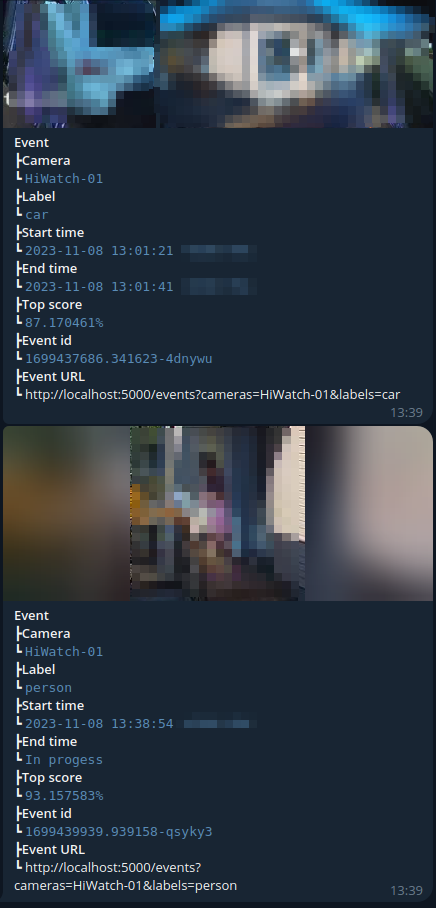
Sends Frigate NVR detection events to Telegram with thumbnails, video clips, and preview snippets. Filters by camera, label, and zone. Supports remote control via REST API and Telegram bot commands.
git clone https://github.com/Zektopic/frigate-telegram.git
cd frigate-telegram
./deploy.sh
The interactive script will:
- Help you create a Telegram bot (via @BotFather)
- Help you find your chat ID
- Collect your Frigate URLs
- Generate secure passwords and API keys
- Write the
.envfile - Build and start the Docker containers
You'll be up and running in under 5 minutes.
- Open Telegram and message @BotFather
- Send
/newbotand follow the prompts - Save the token (e.g.,
1234567890:ABCdefGHIjklMNOpqrsTUVwxyz)
Personal chat:
- Send any message to your bot
- Visit:
https://api.telegram.org/bot<YOUR_TOKEN>/getUpdates - Find
"chat":{"id":123456789}in the JSON response
Group chat:
- Add your bot to the group
- Add @RawDataBot temporarily — it prints the chat ID
- Group IDs are negative (e.g.,
-1003462069191)
cp .env.example .env # or let deploy.sh create it for youEdit .env with your values:
TELEGRAM_BOT_TOKEN=1234567890:ABCdefGHIjklMNOpqrsTUVwxyz
TELEGRAM_CHAT_ID=-1003462069191
FRIGATE_URL=http://localhost:5000
FRIGATE_EXTERNAL_URL=http://192.168.1.9:5000
REDIS_PASSWORD=your-secure-password
REST_API_ENABLE=true
REST_API_KEY=your-api-keydocker compose up -d| Variable | Default | Description |
|---|---|---|
| Required | ||
TELEGRAM_BOT_TOKEN |
"" |
Token from @BotFather |
TELEGRAM_CHAT_ID |
0 |
Target chat ID (negative for groups) |
FRIGATE_URL |
http://localhost:5000 |
Internal Frigate API URL |
FRIGATE_EXTERNAL_URL |
http://localhost:5000 |
External URL for links in messages |
| Frigate | ||
FRIGATE_EVENT_LIMIT |
20 |
Max events per poll |
EVENT_BEFORE_SECONDS |
300 |
Only events within this many seconds |
SLEEP_TIME |
5 |
Seconds between polls |
TIME_WAIT_SAVE |
30 |
Seconds to wait for clip to be ready |
WATCH_DOG_SLEEP_TIME |
3 |
Watchdog poll interval (text events) |
| Media | ||
INCLUDE_THUMBNAIL_EVENT |
true |
Attach thumbnail image |
INCLUDE_CLIP_EVENT |
true |
Attach video clip |
INCLUDE_PREVIEW_EVENT |
true |
Attach preview video snippet |
SHORT_EVENT_MESSAGE_FORMAT |
false |
Compact one-line message format |
SEND_TEXT_EVENT |
false |
Send text-only events (no media) |
| Redis | ||
REDIS_ADDR |
localhost:6379 |
Redis address |
REDIS_PASSWORD |
"" |
Redis password |
REDIS_DB |
0 |
Redis database number |
REDIS_PROTOCOL |
3 |
Redis protocol (2 or 3) |
REDIS_TTL |
1209600 |
Event dedup TTL in seconds (7 days) |
| REST API | ||
REST_API_ENABLE |
false |
Enable HTTP REST API |
REST_API_LISTEN_ADDR |
:8080 |
API listen address |
REST_API_KEY |
"" |
API key for auth (empty = no auth) |
SWAGGER_HOST |
localhost:8080 |
Host shown in Swagger UI |
| Filters | ||
FRIGATE_INCLUDE_CAMERA |
All |
Comma-separated camera list |
FRIGATE_EXCLUDE_CAMERA |
None |
Cameras to exclude |
FRIGATE_INCLUDE_LABEL |
All |
Labels to include (person, car, etc.) |
FRIGATE_EXCLUDE_LABEL |
None |
Labels to exclude |
FRIGATE_INCLUDE_ZONE |
All |
Zones to include |
FRIGATE_EXCLUDE_ZONE |
None |
Zones to exclude |
| Other | ||
DEBUG |
false |
Enable debug logging |
TZ |
UTC |
Timezone |
Send these commands to your bot in Telegram:
| Command | Description |
|---|---|
/help |
Show available commands |
/status |
Show current send/mute status |
/stop |
Pause event notifications |
/resume |
Resume event notifications |
/mute |
Mute notifications (silent send) |
/unmute |
Unmute notifications |
/ping |
Health check (bot replies "pong") |
Security: Commands only work from the configured
TELEGRAM_CHAT_IDchat.
Enable with REST_API_ENABLE=true. All control endpoints require X-API-Key header when REST_API_KEY is set.
| Endpoint | Auth | Description |
|---|---|---|
GET /api/v1/ping |
No | Health check |
GET /api/v1/status |
Yes | Send/mute state |
GET /api/v1/stop |
Yes | Stop sending events |
GET /api/v1/resume |
Yes | Resume sending events |
GET /api/v1/mute |
Yes | Mute notifications |
GET /api/v1/unmute |
Yes | Unmute notifications |
Swagger UI: http://your-host:PORT/docs/index.html
Filter which events are forwarded:
# Only these cameras
FRIGATE_INCLUDE_CAMERA=front_door,back_garden

# Exclude these labels
FRIGATE_EXCLUDE_LABEL=cat,dog

# Only events in these zones
FRIGATE_INCLUDE_ZONE=driveway,front_porch
Set to All (include everything) or None (exclude nothing) to disable filtering.
main.go                           — entrypoint, main loop, graceful shutdown
internal/
  config/config.go                — env var parsing + startup validation
  frigate/frigate.go              — Frigate API client, media download, event filtering
  redis/redis.go                  — Redis state store + circuit breaker
  restapi/restapi.go              — Gin HTTP server with API key auth
  telegram/telegram.go            — Telegram bot command handler
  log/log.go                      — leveled stdout/stderr loggers
- Error throttling: Telegram error notifications are rate-limited to 1 per 15 minutes (all errors still logged locally)
- Redis circuit breaker: After 5 consecutive Redis failures, event processing pauses until Redis recovers
- Config validation: Required fields checked at startup — fails fast with clear errors
- Graceful shutdown: SIGTERM/SIGINT triggers clean shutdown with Telegram notification
- Concurrency limit: Max 5 simultaneous event processors (prevents resource exhaustion)
- HTTP timeouts: 60s Frigate client timeout, 10s/60s REST API timeouts
cd frigate-telegram
git pull
docker compose up -d --buildBot not sending messages?
- Check
docker compose logs frigate-telegram - Verify your bot token:
curl https://api.telegram.org/bot<TOKEN>/getMe - Verify your chat ID:
curl https://api.telegram.org/bot<TOKEN>/getUpdates - Make sure you've sent at least one message to the bot first
Frigate connection errors?
- Verify Frigate is running and port 5000 is accessible
- Check
FRIGATE_URL— from Docker host networking, usehttp://localhost:5000 - Verify:
curl http://localhost:5000/api/version
Redis errors?
- Check
docker compose logs redis - If you see "circuit breaker OPEN" in logs, Redis was down for 5+ consecutive operations
- Redis will auto-recover and the circuit will reset
Duplicate events?
- Events are deduplicated by ID using Redis
- To reset:
docker compose exec redis redis-cli -a <password> FLUSHDB - This will cause all recent events to be re-sent
This is a fork of OldTyT/frigate-telegram with added:
- REST API authentication
- Redis circuit breaker
- Error notification throttling
- Config validation
- Graceful shutdown
- Concurrency limiting
- Docker health checks and log rotation
- Interactive deployment script