
An application belonging to the MAEL project
Copyright (c) 2022 Yonnel Bécognée


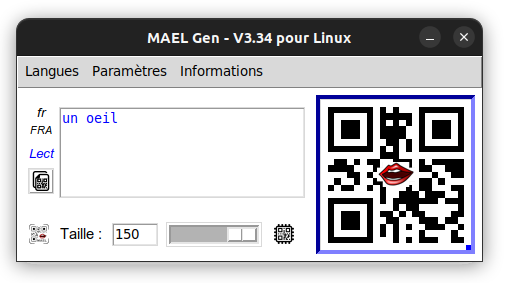
💻 Cross-platform desktop application (Linux, macOS, and Windows) that allows teachers to easily create QR codes containing text that their students can listen to.
They can integrate them into their various teaching materials, thus adding an audio dimension 👂 to their paper documents.
The QR codes will be scanned by students using the MAEL Scan application 🔈 (available on Android 

-
"Read" mode: displays and reads aloud the text contained in the QR code.
-
"Dictate" mode: does not display the text but reads aloud the text contained in the QR code.
-
"Spell" mode: reads aloud each letter of the text contained in the QR code.
-
"MP3" mode: plays a file from Google Drive.
-
Special MP3 sounds: these are sounds from the Borel-Maisonny method and the Consigny Alphabet Book (created by the AMLA Nort area).
-
55 supported languages (except for the "spell" mode for the moment).
🇫🇷 🇬🇧 🇪🇸 🇵🇹 🇧🇷 🇮🇹 🇩🇪 🇷🇺 🇯🇵 🇨🇳 🇰🇷 ...
-
Launch MAEL Gen
-
Enter the text you want to be spoken in the text field (type it, or use
Ctrl + v, or simplyright-click) -
Choose the language (menu
Language) of your text. -
Choose the mode (menu
Settings) according to your objective. -
Adjust the size of the QR code (field
Sizeor slider) -
Paste it into your document: LibreOffice Writer
, Draw
, or any other editor...


⟶ The student will then only have to scan this code with MAEL Scan to listen to the content 🎧...
-
Upload an .mp3 file 🎤 to your Google Drive account
-
Share the folder containing the .mp3 file with anyone who has the link.
-
Retrieve the sharing link.
-
Paste this link into MAEL Gen.
-
Adjust the size (field
Sizeor slider).

⟶ The student will then only have to scan this code with MAEL Scan to listen to the MP3 file 🎧: a poem, a dialogue...
More information:

(To help understand the code)
1️⃣ On first launch
When writing in the text input, the default language is "French" 🇫🇷 and the default mode is "Read":
1- The text first undergoes light "encryption".
2- A QR code containing this text (utf-8) is generated.
⟶ By default, MAEL Scan will understand that it is in read mode and will use the French synthetic voice 🇫🇷.
2️⃣ If you change the language of the content, for example Italian 🇮🇹 :
1- The text to be placed in the QR code receives a prefix such as <it>
2- The text (with its prefix) first undergoes light "encryption".
3- A QR code containing this text (utf-8) is generated.
⟶ MAEL Scan remains in read mode but will this time use the Italian synthetic voice 🇮🇹.
3️⃣ If you switch to dictate mode :
1- The text keeps its prefix such as <it>
2- The text receives a suffix such as #d
2- The text (with its prefix and suffix) first undergoes light "encryption".
3- A QR code containing this text (utf-8) is generated.
⟶ MAEL Scan will this time understand that it is in dictate mode and will use the Italian synthetic voice 🇮🇹.
🗣️ The synthetic voices are those generated by the phone. (GTTS on Android)
| Voice | Prefix |
|---|---|
| Portuguese from Portugal 🇵🇹 | <ptPRT> |
| Portuguese from Brazil 🇧🇷 | <ptBRA> |
📑 See the list of GTTS languages (Probably needs updating...)
4️⃣ On each modification:
A .png file corresponding to the QR code is generated and automatically sent to the clipboard. 📋
(A small icon indicates whether there is a QR code or text in the clipboard)
⟶ The teacher only has to Paste it into their personal editor.
1- "Dictate" mode
-
The current "Dictate mode" (speaking the text without displaying it) will change its name and be called "Hide mode". 🔄
-
The new "Dictate mode" will include:
- reading the text without displaying it,
- speaking the punctuation, and
- displaying the play-pause menu ⏯️ (with scroll bar).
2- "MP3" mode
-
Creation of a MAEL Cloud ☁️ with fewer limitations than Google Drive (hosted with the MAEL Phrase platform).
-
Addition of an option (suffix) that will indicate to MAEL Scan that it must keep the MP3 file 📥 so as not to have to re-download it if it is scanned again.
3- Interface
-
Replacement of TKinter with TTKBootstrap
-
Moving the 4 mode-switch buttons from the “Settings” menu to the location of the size slider (which will be removed).
-
Management of right-to-left languages ⬅️ such as Arabic or Hebrew.
4- Batch verification of QR codes
When creating a document containing several QR codes, it becomes easier to make mistakes (for example, placing the same QR code twice... 😅 ).
I therefore started creating a quick QR code verification function.
-
Will propose taking a screenshot of the document to be checked
-
Will detect the QR codes in the captured image
-
Will add to the image the text of each QR code found
I started with TKinter for the interface to select the area to capture (already used by MAEL Gen), mss for the capture itself, and possibly OpenCV for detecting and reading QR codes.
🛟 To get help regarding the use of MAEL Gen or to participate in development 💻, write to me here:
Many thanks to all the people who will contribute to this project!
| Avatar | Name | GitHub | Role |
|---|---|---|---|
 |
Bécognée Yonnel | @Yobeco | Maintainer |
 |
Padawan | @Nail-yk | Documentation translation |
| ... | ... | ... | Python developer |
To try MAEL Gen, run the script:
git clone https://github.com/Yobeco/MAEL_Gen.git
cd MAEL_Gen
python3 -m venv mael_venv
source mael_venv/bin/activate
pip install -r requirements.txt
python3 MAEL_V5.0.py