
An application that lets you chat with AI language models, either running locally with Ollama or provided by an online AI service.
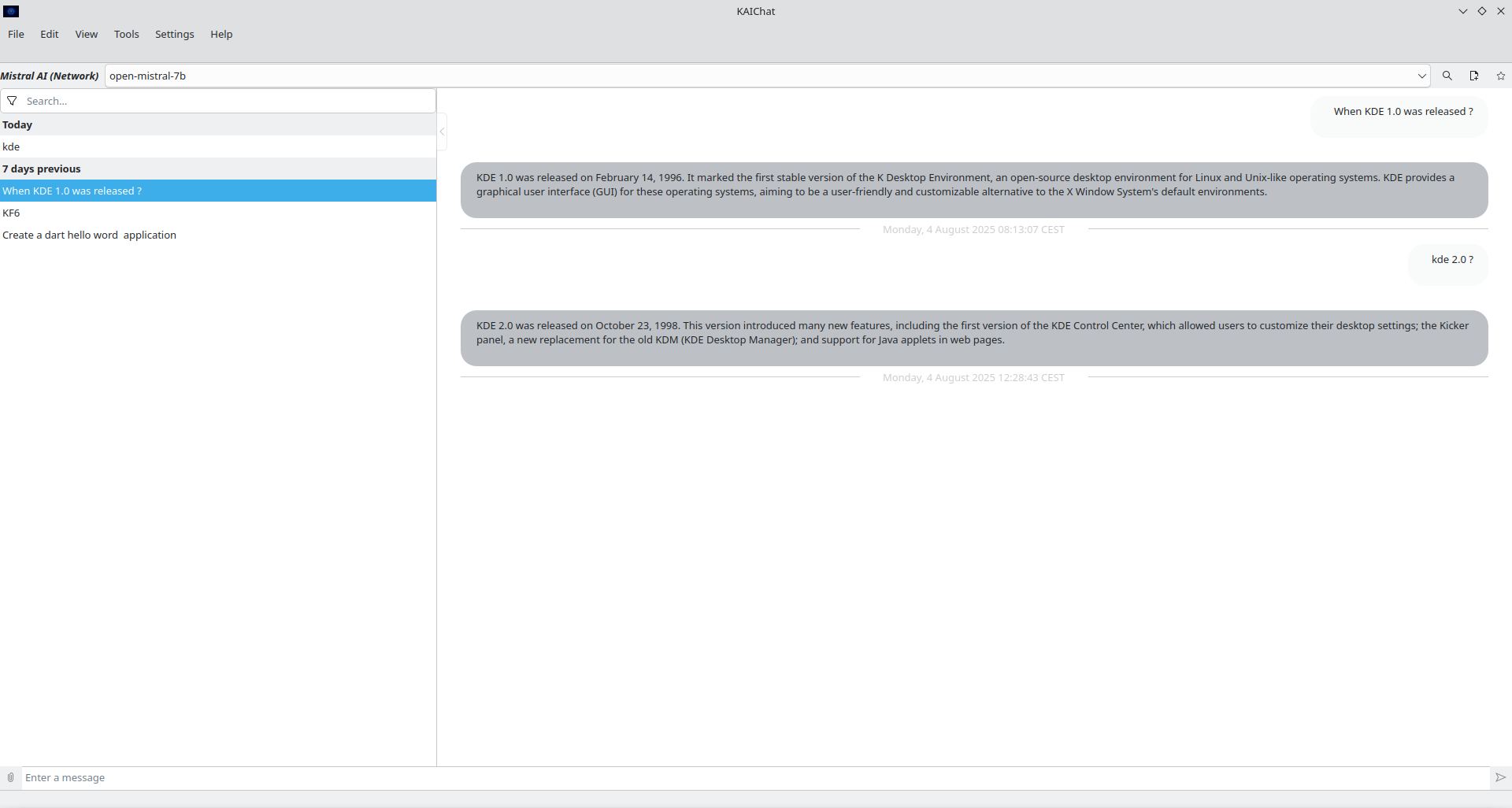

KAIChat is a KDE desktop client for large language models. It keeps your conversations in a local database, so chats survive restarts and can be searched, archived, imported and exported.
The AI back-ends themselves are not implemented in this repository: they come from
the textautogeneratetext library of ktextaddons,
which KAIChat wraps into a regular KXmlGui application. KAIChat adds the main window,
the menus and actions, the import/export jobs, the command-line and D-Bus interfaces,
a System Settings module and a few plugins.
- Several named chats, kept in a local database and restored at startup
- Archive chats you no longer need, and show or hide them (View → Show Archive)
- Full-text search across the stored conversations (Edit → Search in Database…,
or
Ctrl+F) - Quick Ask: a small standalone dialog to ask a single question without opening
the main window. Available from Tools → Open Quick Ask…, with the
Meta+Spaceglobal shortcut, or withkaichat --quick-ask - File attachments and model tools can be passed to a question
An instance is one configured connection to a model provider. You can define several of them and switch between them. The available providers depend on the plugins shipped by ktextaddons, and currently include:
- Local: Ollama, llama.cpp, LM Studio
- Hosted: Ollama Cloud / Ollama Online, OpenAI (ChatGPT), Anthropic, Mistral AI, Groq Cloud, Grok (X.ai), Qwen (DashScope), OpenRouter, DeepInfra, Novita AI, Cerebras, Kluster AI, Venice, Kimi (Moonshot AI), Sarvam AI, CompactifAI, AtlasCloud, and other OpenAI-compatible endpoints
Run kaichat --plugin-info to list the back-ends and tools actually available in
your build, and kaichat --list-instances to list the instances you configured.
- Export the current chat as JSON (
*.kaichat), Markdown, plain text or PDF (File → Export…) - Import a chat from JSON (File → Import…,
kaichat --import <file>, or by passing the file as an argument —*.kaichatfiles are registered under theapplication/vnd.kde.kaichatMIME type)
- MCP servers: connect the model to Model Context Protocol servers
(optional, see
USE_MCP_SERVER_SUPPORTbelow) - Tool plugins, which the model can call. This repository ships a current date and time tool; more live in kaichat-addons
- Text plugins, which act on the text of a message. This repository ships a web-shortcut lookup plugin and, when Purpose is available, a "share text" plugin
- System Settings module (
kcm_autogeneratetext) to configure instances and MCP servers outside the application - Optional system tray icon, and notifications when a model download finishes
- Single-instance behaviour, via D-Bus or KDSingleApplication
- D-Bus interface
org.kde.kaichat.Application(see below) - Spell checking (Sonnet), optional text-to-speech, color-scheme switching,
full screen (
F11), hideable menu bar with a hamburger menu - Increase or decrease the global font size with
Ctrl++andCtrl+-
| Option | Description |
|---|---|
--list-instances |
Print the configured instances and exit |
--list-chats |
Print the stored chat titles and exit |
--plugin-info |
Print the available text and tool plugins and exit |
--instance <name> |
Start with a specific instance |
--new-chat <title> |
Create a new chat |
--switch-to-chat <name> |
Switch to an existing chat by title |
--switch-to-chat-from-id <id> |
Switch to an existing chat by identifier |
--ask-message <message> |
Ask a question straight away |
--attach <url> |
Attach a file to the question (repeatable) |
--tool <name> |
Enable a tool for the question (repeatable) |
--quick-ask |
Open the Quick Ask dialog and exit |
--import <file> |
Import a chat from a JSON file |
--start-ollama |
Start the local Ollama program |
--debug |
Enable debug mode and show the hidden Debug menu |
--feedback |
List available user-feedback sources (with KUserFeedback) |
[file…] |
Chat files to import |
Because KAIChat is a single-instance application, running it again with options forwards them to the running instance.
When built with D-Bus support, the running application exports
org.kde.kaichat.Application on the org.kde.kaichat service:
IFACE=org.kde.kaichat.Application
qdbus org.kde.kaichat /Application $IFACE.chatsList
qdbus org.kde.kaichat /Application $IFACE.createNewChat "My chat"
qdbus org.kde.kaichat /Application $IFACE.switchToChat "My chat"
qdbus org.kde.kaichat /Application $IFACE.switchToChatId "<id>"
qdbus org.kde.kaichat /Application $IFACE.showArchived true
qdbus org.kde.kaichat /Application $IFACE.ask "Hello"| Path | Contents |
|---|---|
~/.config/kaichatrc |
Application settings |
~/.local/share/kaichat/ai-database/ |
Chats and messages databases |
API keys for hosted services are stored by ktextaddons with the rest of the instance configuration; treat those files as secrets.
You can get KAIChat from:
git clone https://invent.kde.org/utilities/kaichat.git
# or, over SSH
git clone git@invent.kde.org:utilities/kaichat.git
Extra plugins can be found in the kaichat-addons repository:
git clone https://invent.kde.org/utilities/kaichat-addons.gitcmake3.29 or later andextra-cmake-modules6.26 or later- Qt 6.10 or later:
Widgets,Sql - KDE Frameworks 6.26 or later:
kcoreaddons,kconfig,ki18n,kwidgetsaddons,kxmlgui,kiconthemes,kcrash,kwindowsystem,knotifyconfig,knotifications,kcmutils,syntax-highlighting,kglobalaccel,kio,sonnet,kstatusnotifieritem ktextaddons2.1.44 or later, with theTextAutoGenerateText,TextAutoGenerateTextMcpProtocolWidgets,TextAddonsWidgetsandTextCustomEditorcomponentsshared-mime-info1.10 or later
Optional: kdbusaddons (or KDSingleApplication when D-Bus support is disabled),
purpose, kuserfeedback, kdoctools, ktextaddons' TextEditTextToSpeech.
kglobalaccel is not used on Windows, macOS and Haiku, and purpose is not used
on macOS.
mkdir build
cd build
cmake ..
make
make install
Or using the CMake presets (requires CMake 3.20 or later):
cmake --preset dev && cmake --build --preset devUsing the mold linker:
cmake --preset dev-mold && cmake --build --preset dev-moldOther presets are defined in CMakePresets.json: release, asan, clazy,
coverage, dev-clang, unity, profile, ftime-trace and check-cmake.
| Option | Default | Description |
|---|---|---|
USE_DBUS |
Unix, not macOS | Build the D-Bus service and adaptor |
USE_MCP_SERVER_SUPPORT |
ON |
MCP server support (experimental) |
USE_MOLD_LINKER |
ON |
Use the mold linker when it is found |
USE_UNITY_CMAKE_SUPPORT |
OFF |
Unity build, to speed up compilation |
WARNINGS_AS_ERRORS |
OFF |
Build with -Werror (/WX on MSVC) |
BUILD_TESTING |
ON (from ECM) |
Build the autotests |
When USE_DBUS is off, KDSingleApplication is used instead to keep the
application a single instance.
Run the tests with ctest from the build directory.
The sanitizers.supp file can be used to suppress known reports, for example:
LSAN_OPTIONS=suppressions=../sanitizers.supp ./bin/kaichatKAIChat can be built with CMake unity build support:
cmake --preset unity && cmake --build --preset unitySee readme-build-ftime.txt for measuring compilation time with
ClangBuildAnalyzer and the ftime-trace preset.
Contributions are welcome. We use https://invent.kde.org/.
Source formatting is enforced by clang-format through a pre-commit hook; see
README-pre-commit.md for how to install it. Release steps are described in
README-RELEASE.md.
The KDE Community Code of Conduct applies.
This project is licensed under the GPL-2.0-or-later.
More information can be found in the LICENSES folder.
- Laurent Montel montel@kde.org