The HyperText Transfer Protocol (HTTP) is a standard that defines how a web client talks to a web server and how data is transferred from the server back to the client. It is the foundation of any data exchange on the Web.
HTTP is the standard protocol used to transfer data over the web. It is a request-response protocol that works as follows:
- A client sends a request to a server.
- The server processes the request and sends a response back to the client.
- The client processes the response.
- The connection is closed.
HTTP is a stateless protocol, meaning that each request-response pair is independent of any other request-response pair. This means that the server does not store any information about the client between requests.
HTTP is a connectionless protocol, meaning after the client has established a connection with a server, sent a request, and received a response, the connection is immediately dropped.
HTTP Connections use the TCP/IP protocol for data transfer. The default port for HTTP is 80.
GET /index.html HTTP/1.1
Host: www.example.com
User-Agent: Mozilla/5.0 (Windows NT 10.0; Win64; x64) AppleWebKit/537.36 (KHTML, like Gecko) Chrome/91.0.4472.124 Safari/537.36
Accept: text/html,application/xhtml+xml,application/xml;q=0.9,image/webp,*/*;q=0.8
Accept-Language: en-US,en;q=0.5
Accept-Encoding: gzip, deflate, br
Connection: keep-alive
Upgrade-Insecure-Requests: 1
Cache-Control: max-age=0
HTTP/1.1 200 OK
Date: Mon, 26 Aug 2024 12:00:00 GMT
Server: Apache/2.4.41 (Ubuntu)
Last-Modified: Sun, 25 Aug 2024 23:11:55 GMT
ETag: "1a3b-603fcbf0"
Accept-Ranges: bytes
Content-Length: 6715
Keep-Alive: timeout=5, max=1000
Connection: Keep-Alive
Content-Type: text/html; charset=UTF-8

<!DOCTYPE html>
<html lang="en">
<head>
    <meta charset="UTF-8">
    <title>Example Page</title>
</head>
<body>
    <h1>Welcome to Example.com</h1>
    <!-- Rest of the HTML content -->
</body>
</html>
HTTP defines a set of request methods to indicate the desired action to be performed for a given resource. These methods are also known as HTTP verbs. Each method has a specific purpose and defines how the server should interact with the resource.
Syntax :
METHOD /path/to/resource HTTP/1.1
Date: Mon, 26 Aug 2024 12:00:00 GMT
Host: www.example.com
Content-Type: application/json
Content-Length: 25

{
  "key": "value"
}
Retrieve data from a specified resource.
Characteristics:
- Requests data from the server.
- Does not change the state of the resource (safe and idempotent).
- Parameters can be included in the URL (query string).
Example:
GET /index.html HTTP/1.1
Host: www.example.com
Submit data to be processed to a specified resource.
Characteristics:
- Often used for submitting form data or uploading a file.
- Changes the state of the resource (not idempotent).
- The data is sent in the request body. Example
POST /submit-form HTTP/1.1
Host: www.example.com
Content-Type: application/x-www-form-urlencoded

name=John&age=30
Update or replace a resource with new data.
Characteristics:
- If the resource does not exist, it can create a new one.
- The request body contains the new data.
- Idempotent (repeating the same PUT request will result in the same outcome).
Example
PUT /users/123 HTTP/1.1
Host: www.example.com
Content-Type: application/json

{
  "name": "John Doe",
  "age": 30
}
Delete the specified resource.
Characteristics:
- Removes the resource from the server.
- Idempotent (repeating the same DELETE request will result in the same outcome).
Example
DELETE /users/123 HTTP/1.1
Host: www.example.com
Retrieve the headers of a resource without the body.
Characteristics:
- Similar to GET, but the response contains only headers, no body.
- Useful for checking if a resource exists or if it has been modified.
Example
HEAD /index.html HTTP/1.1
Host: www.example.com
Apply partial modifications to a resource.
Characteristics:
- Updates only certain parts of the resource.
- Not necessarily idempotent, depending on the nature of the changes.
Example
PATCH /users/123 HTTP/1.1
Host: www.example.com
Content-Type: application/json

{
  "age": 31
}
Describe the communication options for the target resource.
Characteristics:
- Used to determine the allowed HTTP methods on a resource.
- The response contains the allowed methods in the Allow header.
Example
OPTIONS /index.html HTTP/1.1
Host: www.example.com
Establish a tunnel to the server, often used for HTTPS.
Characteristics:
- Commonly used with SSL/TLS for encrypted communication.
Example
CONNECT www.example.com:443 HTTP/1.1
Host: www.example.com
- 1xx: Informational
- 2xx: Success
- 3xx: Redirection
- 4xx: Client Error
- 5xx: Server Error
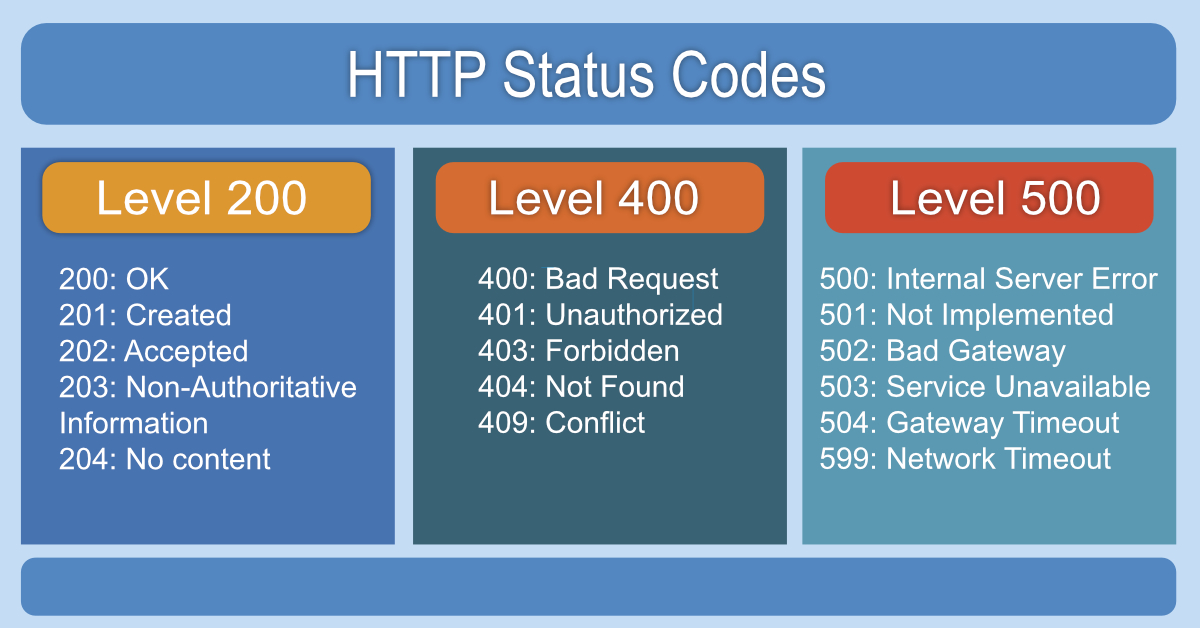
HTTP Cookies are small pieces of data sent by a server to a client's web browser and stored on the client side. They are used to remember information about the user across multiple requests, such as authentication status, user preferences, and tracking information.
Cookies consist of key-value pairs, along with optional attributes that define their scope and behavior.
Example:
Set-Cookie: sessionId=abc123; Expires=Wed, 27 Sep 2024 12:00:00 GMT; Path=/; Domain=example.com; Secure; HttpOnly- sessionId=abc123: The cookie's name and value.
- Expires: The expiration date of the cookie.
- Path: The URL path where the cookie is accessible.
- Domain: The domain for which the cookie is valid.
- Secure: Ensures the cookie is sent over HTTPS only.
- HttpOnly: Restricts the cookie from being accessed by client-side scripts.
CookieHandler is an abstract class in Java that provides a mechanism for managing cookies.
-
Default Behavior: The
CookieHandleris used by HTTP clients to handle cookies automatically. -
Methods:
put(URI uri, Map<String, List<String>> responseHeaders): Stores cookies from HTTP responses.get(URI uri, Map<String, List<String>> requestHeaders): Adds stored cookies to HTTP requests.
CookieManageris the default implementation of CookieHandler and manages cookies using a CookieStore.
-
Automatic Management: Automatically manages cookies according to HTTP specifications.
-
Usage:
- By default,
CookieManagerstores cookies in memory. - It handles both session and persistent cookies.
- By default,
-
Example
CookieManager cookieManager = new CookieManager();
CookieHandler.setDefault(cookieManager);
Three policies are defined :
CookiePolicy.ACCEPT_ALLcookiePolicy.ACCEPT_NONEcookiePolicy.ACCEPT_ORIGINAL_SERVER: only first party cookies
A Custom Cookie Manager allows developers to implement their own cookie management logic by extending CookieManager or CookieHandler.
- Customization: Control over how cookies are stored, retrieved, and managed.
- Example:
public class CustomCookieManager extends CookieManager {
  @Override
  public void put(URI uri, Map<String, List<String>> responseHeaders) throws IOException {
      // Custom logic for storing cookies
      super.put(uri, responseHeaders);
  }

  @Override
  public Map<String, List<String>> get(URI uri, Map<String, List<String>> requestHeaders) throws IOException {
      // Custom logic for retrieving cookies
      return super.get(uri, requestHeaders);
    }
  }

  CookieHandler.setDefault(new CustomCookieManager());
CookieStore is an interface used by CookieManager to store cookies. It defines how cookies are stored and retrieved.
Methods:
add(URI uri, HttpCookie cookie): Adds a cookie to the store.get(URI uri): Retrieves cookies associated with a specific URI.getCookies(): Retrieves all stored cookies.remove(URI uri, HttpCookie cookie): Removes a specific cookie.removeAll(): Clears all cookies from the store.
Default Implementation: The default CookieStore implementation stores cookies in memory.
CookieStore store = cookieManager.getCookieStore();Custom Implementation: You can implement your own CookieStore to store cookies in a database, file, or any other storage mechanism.
Example:
  CookieStore cookieStore = new InMemoryCookieStore();
  CookieManager cookieManager = new CookieManager(cookieStore, CookiePolicy.ACCEPT_ALL);
CookieHandler.setDefault(cookieManager);The HttpCookie class in Java represents an HTTP cookie, allowing you to manage cookies in HTTP communication. It's part of the java.net package.
- Stores Cookie Data: Holds cookie attributes like name, value, domain, path, etc.
- Cookie Management: Works with
CookieManagerandCookieStorefor handling cookies in HTTP connections. - Parses Cookies: Can create
HttpCookieobjects from cookie headers.
HttpCookie(String name, String value)Creates a cookie with the specified name and value.
getName(): Returns the cookie's name.getValue(): Returns the cookie's value.setValue(String value): Sets the cookie's value.getDomain()/setDomain(String domain): Gets/Sets the cookie's domain.getPath()/setPath(String path): Gets/Sets the cookie's path.hasExpired(): Checks if the cookie has expired.setMaxAge(long expiry): Sets the cookie's max age (in seconds).
HttpCookie cookie = new HttpCookie("username", "Prem");
cookie.setDomain("example.com");
cookie.setPath("/");
cookie.setMaxAge(3600); // 1 hour
This example creates a cookie with a 1-hour lifespan, valid for the "example.com" domain.
CookieManager cookieManager = new CookieManager();
CookieStore store = cookieManager.getCookieStore();

// creating cookie and uri
HttpCookie c1 = new HttpCookie("user1", "1");
HttpCookie c2 = new HttpCookie("user2", "2");

URI uri1 = URI.create("htttp://spm.com.np");
URI uri2 = URI.create("htttp://spm.com.np");


// add
store.add(uri1, c1);
store.add(uri2, c2);


List<HttpCookie> cookiesList = store.getCookies();

// remove
store.remove(uri1,c1);

//remove all
store.removeAll();