Hyper currently provides official CLI builds for Linux and Mac.
- Linux x86
- Mac OS X 10.7 (lion) or later
- Windows (Beta)
- Linux ARM (Beta)
Please note The hyper client will attempt to update itself to the latest version once per day automatically. If you don't want to wait for the next daily cycle, just remove ~/.hyper/cktime.json, and the check will occur immediately.
$ curl -O https://hyper-install.s3.amazonaws.com/hyper-mac.bin.zip
$ unzip hyper-mac.bin.zip
$ ./hyper --help
or
$ brew install hyper
$ wget https://hyper-install.s3.amazonaws.com/hyper-linux-x86_64.tar.gz
$ tar xzf hyper-linux-x86_64.tar.gz
$ ./hyper --help
- Download package from https://hyper-install.s3.amazonaws.com/hyper-win64.zip
- Unzip this package
- Open Windows Command Prompt and run .\hyper.exe --help
Note: this package on Windows is beta version, please file a bug at here if you find any issue.
$ wget https://hyper-install.s3.amazonaws.com/hyper-arm.tar.gz
$ tar xzf hyper-arm.tar.gz
$ ./hyper --help
Once the installation completes, enter hyper config in your terminal and the CLI will prompt you for your API credential:
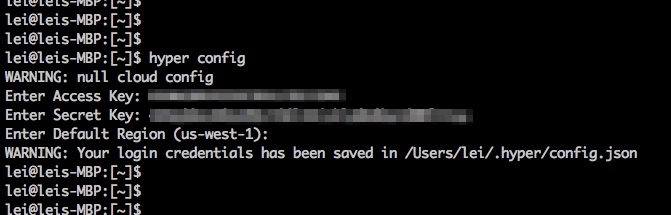
The credential is stored in a local configuration file $HOME/.hyper/config.json. The configuration file is similar to Docker's, with an extra section clouds.
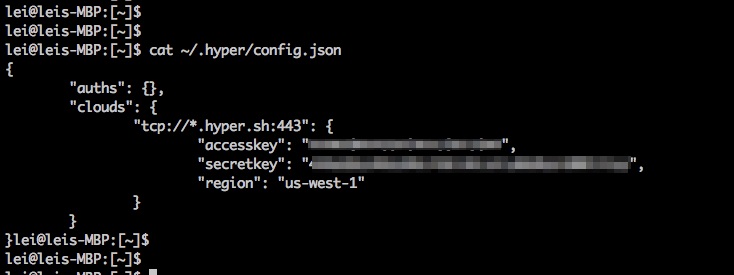
Or you can use environment vairables HYPER_ACCESS and HYPER_SECRET to pass the access key and secret key to the CLI which will search for these environment variables before loading the configuration file.