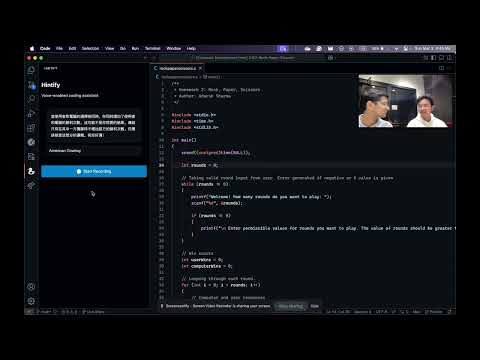
While everyone is thinking about creating apps in just one prompt, we are thinking of how to be better developers. Hintify, unlike other AI tools won't give you direct code to your needs. Instead, it gives you hints about your logic error in code and then you figure the error out!
-
Code help: We scrape your active session code and give you hints on what's wrong with your code. Be it logical or compile time error.
-
Voice Query: While it will gives you suggestions every minute, you have the ability to query it anytime you want.
-
Language Support: You can talk to it 90+ languages.
Stuck on how to write a binary search? Ask it and get a response in Mickey Mouse, Yoda and more voices
☐ axios
☐ dotenv
☐ elevenlabs
☐ openai
☐ sox
☐ afplay (Mac Specific, comes pre-installed)
Follow these steps to set up and run the Hintify VS Code extension on your computer.
git clone git@github.com:HandsomeSB/Hintify.git
cd Hintifynpm installbrew install sox- Download and install Sox.
- Add Sox to your system's PATH environment variable.
code .create a .env file in the project root directory and add elevenlabs and openai api keys.
OPENAI_KEY=
ELEVEN_KEY=npm run testAlternatively, press F5 in VS Code to start a new Extension Development Host window.
- Once installed, Hintify runs automatically in the background.
- Click on the Hintify's icon on the left pane to bring up the Hintify panel.
- Press the Push to talk Button and start conversing with Mickey Mouse, your personal coding Buddy